
How to Integrate Room Booking with Google Calendar and Outlook: The Complete 2026 Guide
Key Takeaways
- Integrating room booking with Google Calendar and Outlook means linking one booking platform to Google Workspace and Microsoft 365, so every reservation syncs both ways.
- Google treats rooms as resource calendars; Microsoft treats them as Exchange room mailboxes, provisioned and queried through different application programming interfaces (APIs).
- Native tools book rooms but stop short: neither Google nor Microsoft offers cross-platform booking, and no-show release depends on declines, panels, or extra licences.
- Real-time sync needs webhooks plus incremental sync tokens, and neither Google’s channels nor Microsoft’s subscriptions renew themselves; both typically lapse within seven days.
- Recurring meetings are a common failure point: sync must track single-occurrence exceptions, not only the series, since Google and Microsoft model them differently.
- Worklytics puts meeting room no-shows at 25% to 35% of bookings, so QR (Quick Response) check-in with auto-release matters as much as sync.
- Grant least-privilege permissions scoped to room calendars; Material Security found 47.2% of 22,332 connected Workspace apps idle for 90+ days, still authorised.
Integrating room booking with Google Calendar and Outlook means connecting a booking platform to each calendar system through its official API: the Google Calendar API for Google Workspace and Microsoft Graph for Microsoft 365. Done properly, a reservation made in the booking app, in Google Calendar, or in Outlook shows up everywhere within seconds, recurring meetings stay aligned, and rooms nobody turns up for are released automatically.
That matters because the calendar entry has effectively replaced the room. Nobody walks to a conference room door to see whether it’s free; they open a calendar, glance at a slot, and click. When that entry is wrong (double-booked, out of date, or held by a meeting that never happens), the room is lost to everyone else, even while it sits empty.
Getting it right takes four things working together: scoped authentication, real-time synchronisation, clear conflict rules, and check-in so that bookings reflect who actually showed up.
Why Calendar Integration Decides Whether Meeting Rooms Get Used
Four patterns in current workplace data explain why room booking software integration has moved onto IT (information technology) and workplace roadmaps.
- Demand is squeezed into the middle of the week: Ronspot’s 2026 Workplace Statistics and Benchmarks Report found that 98% of organisations record peak utilisation between Tuesday and Thursday. Envoy’s office-entry data shows the same shape: in spring 2025, Tuesday accounted for 25.1% of weekly entries and Friday for 10%. When most meetings chase the same midweek hours, a calendar that lags by even a few minutes produces double bookings.
- Many bookings never become meetings: Worklytics reports that 25% to 35% of meeting room reservations end as no-shows, with the highest rates around lunchtime and late afternoon. A calendar can show a room as busy; it cannot show whether anyone arrived.
- Rooms are often the wrong size: Ronspot’s benchmarks also note that in nearly 45% to 50% of cases, a meeting room is used by a single person regardless of how many it seats. Sync tells you a room was booked; only usage data tells you whether it was the right room.
- Offices still have spare capacity: Qudify’s meeting room utilisation analytics playbook, drawing on the XY Sense Workplace Utilization Index, puts global office utilisation at 43% through 2025 and 45% by March 2026. The constraint is rarely floor area; it’s how that area is booked and released.
What a No-Show Actually Costs
The cost of phantom bookings can be estimated with one formula:
Annual no-show cost = room area × annual occupancy cost per square foot × share of working hours booked × no-show rate
Input (illustrative) | Value |
Room | 12-seat room of 250 to 300 square feet (sq ft) |
Annual lease and operating cost | $50 per sq ft, so $12,500 to $15,000 a year |
Share of working hours booked | 60%, the low end of Ronspot’s typical 60% to 75% booked-hours benchmark |
No-show rate | 25% to 35%, the Worklytics range |
Annual cost of no-shows | About $1,875 to $3,150 per room |
Across 20 similar rooms, that’s roughly $37,500 to $63,000 a year spent on reservations nobody uses. For Indian offices, replace the cost input with your rent per sq ft per month multiplied by 12, plus maintenance and utilities.
Demand isn’t spread evenly across the week either. A booking system that can’t tell a Tuesday from a Friday ends up planning for an average day that doesn’t exist.
How Google Calendar Handles Room Booking on Its Own
Rooms Are Resource Calendars
In Google Workspace, a meeting room is a calendar with its own email address, created in the Admin console under Buildings and resources. Users book it by adding the room to an event like any other guest, and the room accepts or declines based on its availability and the user’s booking rights. Any app that can create a Google Calendar event can therefore book a room without a dedicated booking mechanism.
Room creation sits outside the Calendar API. Rooms, buildings and features are provisioned through the Admin SDK (software development kit) Directory API, which is why most integrations enable both APIs from day one. Once a room exists, it reads like any other calendar: free/busy lookups, event lists and change monitoring all work the same way.
What Google Adds Natively
- Room release on declines. Administrators can automatically release booked rooms when all but one guest declines an event, and the organiser receives an email. Google introduced the feature after its own internal study found that up to 40% of rooms were booked but went unused.
- Room Insights. The Admin console’s Room Insights dashboard shows how rooms are booked. Rooms with Google Meet hardware and occupancy detection turned on add data on actual use.
Where Google Stops
Google’s release logic runs on declines, not attendance. A meeting everyone accepted, and nobody attended, still holds the room, and outside rooms fitted with Meet hardware, Calendar has no way of knowing whether anyone turned up. There’s also no QR walk-up booking, no visitor-facing booking flow, no organisation-specific rules such as “meetings under 30 minutes don’t need a room”, and no visibility into rooms that live in Microsoft 365.
How Outlook and Microsoft 365 Handle Room Booking on Their Own
Rooms Are Exchange Room Mailboxes
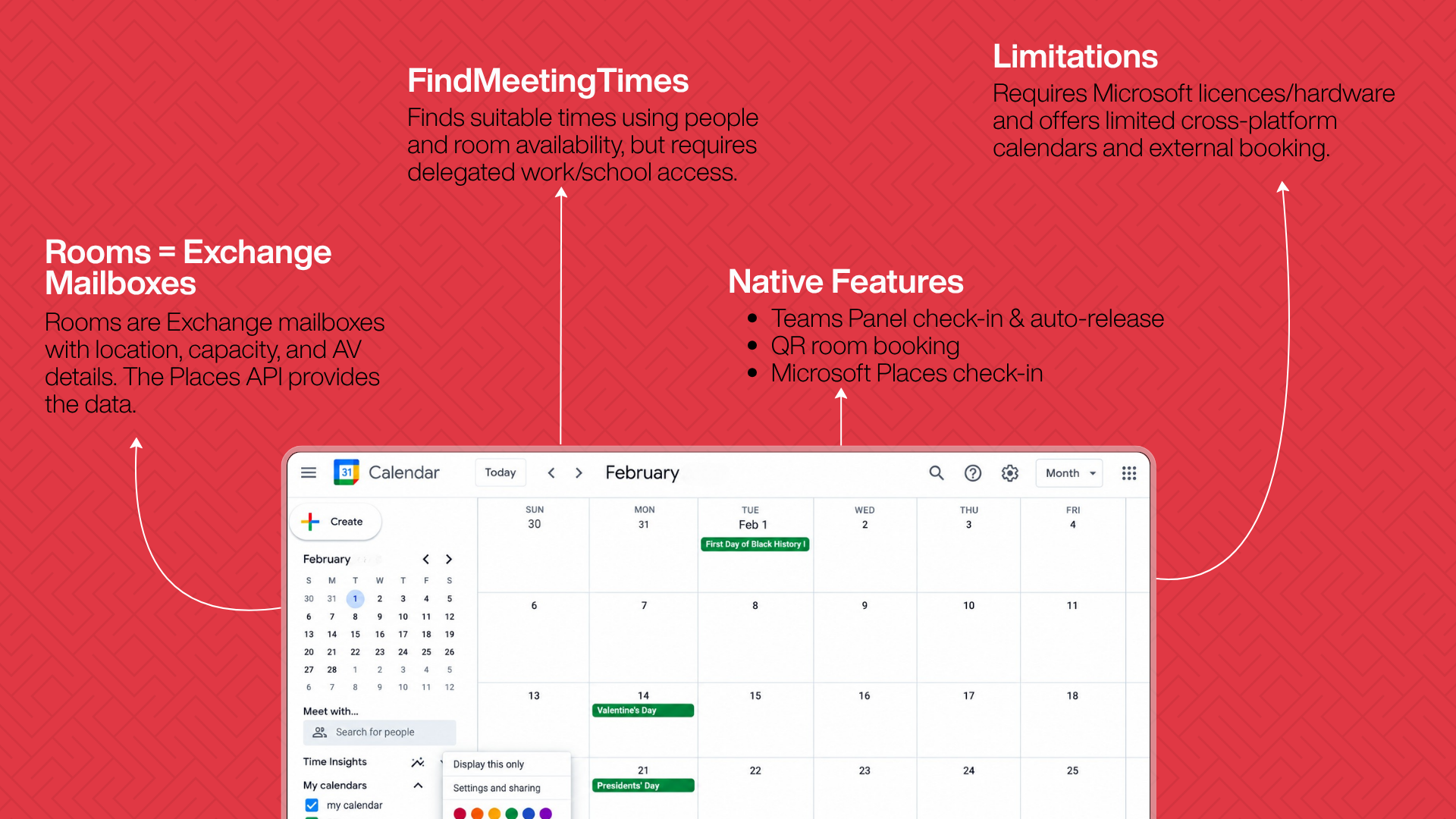
Every room in a Microsoft 365 tenant is a room mailbox in Exchange Online, carrying metadata such as capacity, building, floor, and audio-visual (AV) equipment. When a room is added to an Outlook meeting, it’s treated as a resource attendee and responds automatically according to its booking policy. Rooms can be grouped into room lists, which lets Outlook’s Room Finder filter spaces by building or floor.
Integrations read this inventory through the Microsoft Graph Places API. One practical catch: rooms hidden from the global address list (GAL) aren’t returned, so a room that never appears in the booking platform is often a directory setting rather than a sync bug.
findMeetingTimes: Useful, With Limits
Graph’s findMeetingTimes action suggests meeting times and locations from attendee availability and constraints, weighing people and rooms in a single call. Microsoft documents it for delegated access on work or school accounts only; personal Microsoft accounts and application (app-only) permissions aren’t supported.
In practice, a background booking service can’t call it without a signed-in user, and consumer outlook.com accounts are excluded entirely. That matters if your organisation, or your clients, include smaller businesses on consumer email.
What Microsoft Adds Natively
- Check-in and auto-release on Teams panels. Once enabled, Teams panels require someone to check in at the room and release it if nobody does within the chosen window. The feature is off by default.
- QR booking on panels. Microsoft’s Teams panels overview notes that the Teams Shared Device licence unlocks panel features including QR code booking and auto-release for spaces without a Teams Rooms device.
- Microsoft Places autorelease. Microsoft Places extends check-in and autorelease, but eligibility depends on licences, and Microsoft recommends limiting it to rooms with Teams panels or Teams Rooms devices so users have a way to check in.
Where Microsoft Stops
Microsoft’s no-show recovery is tied to its own hardware and licences. Room data stays inside the Microsoft tenant, so a company with Google calendars elsewhere gets no shared view, and there’s no organisation-branded booking experience outside Microsoft’s own apps.
Google Calendar vs Outlook: Native Room Booking Compared
Capability | Google Calendar (native) | Outlook / Microsoft 365 (native) |
How a room is modelled | Resource calendar with its own email address | Exchange room mailbox with capacity, location and equipment metadata |
Book via the event’s guest or location field | Yes | Yes |
Where rooms are provisioned and read | Admin console and Admin SDK Directory API | Exchange admin tools; read through the Graph Places API |
QR walk-up booking | No | Yes, on licensed Teams panels |
Auto-release of unused rooms | Partial: releases a room when all but one guest declines | Yes, through Teams panels or Microsoft Places, licence-dependent |
Utilisation reporting | Room Insights; actual-use data needs Meet hardware | Admin and device reporting; depth depends on licences |
Cross-platform booking (Google and Microsoft) | No | No |
Branded, organisation-specific booking interface | No | No |
The shared gap shows most clearly in mixed estates: sales on Google Workspace after an acquisition, everyone else on Microsoft 365, and neither calendar aware of the other’s rooms. Closing that gap is the job of a calendar-agnostic booking layer. For a vendor-by-vendor view of how booking platforms handle it, see Qudify’s comparison of the best meeting room booking software in 2026.
How Two-Way Room Booking Sync Works
A dependable integration is three coordinated systems: authentication, synchronisation, and conflict resolution. When any one is weak, the failure shows up as double-booked rooms at peak hours, utilisation numbers facilities teams can’t trust, and employees who quietly stop using the booking app.
Authentication: OAuth 2.0 With Least-Privilege Scopes
Every legitimate integration starts with OAuth 2.0 (Open Authorization), never shared passwords or screen-scraping. An administrator grants the booking platform access limited to what the feature needs, typically reading and writing room calendars and checking free/busy. Every additional scope widens what a leaked token could reach.
- Google Workspace: a service account with domain-wide delegation, authorised in the Admin console for a short, named list of scopes.
- Microsoft 365: application permissions such as Calendars.ReadWrite granted in Microsoft Entra ID apply to every mailbox in the tenant. RBAC (role-based access control) for Applications in Exchange Online lets administrators confine an app to a defined set of mailboxes instead. Microsoft’s own documentation uses a room booking system as its example, and the feature replaces the older Application Access Policies.
Dormant grants are the other half of the risk. Material Security’s 2026 OAuth risk report analysed 22,332 OAuth-connected apps across 21 enterprise Google Workspace environments. It found 47.2% had no recorded use in 90 days or more with their authorisations still intact, and more than a thousand still held live tokens for users who no longer existed. A room booking integration abandoned after a pilot, still holding calendar access, is exactly this kind of grant.
Strong, proven value: space and cost analytics, operational efficiency (routing, no-show release, triage), and trend forecasting all reliable because they run on the platform’s own historical data.
Promising but needs oversight: anomaly flagging and watchlist matching. Both are useful filters for human attention, weak as autonomous gatekeepers.
Overstated; treat with caution: any claim to “detect every suspicious visitor” (intent isn’t in the data) or “eliminate unauthorised access” (tailgating, credential sharing and social engineering remain human problems).
Synchronisation: Push Notifications Plus Incremental Sync
Neither platform streams full event data by default. Both use the same basic pattern:
- The calendar platform sends a notification that something on a watched room calendar has changed.
- The booking platform calls the API with its stored token to fetch only what changed since the last sync.
- It stores the new token and updates its own records.
The mechanics differ in ways that matter for anyone running both:
Google Calendar API | Microsoft Graph | |
Notification mechanism | Watch channel on a calendar’s events | Change-notification subscription on a room mailbox’s events |
What a notification carries | A change signal only, with no event details | The changed item’s identity; event properties only with rich notifications |
How long it lasts | Default time-to-live of 604,800 seconds (seven days) | Up to 10,080 minutes (under seven days); 1,440 minutes (under one day) when notifications include resource data |
How it’s renewed | No automatic renewal: create a new channel before expiry, then stop the old one | Extend the existing subscription before expiry and handle lifecycle notifications |
How changes are fetched | Incremental sync with a sync token | Delta query with a delta token |
Two operational details catch teams out. First, renewals run on each platform’s own schedule, so one renewal job built for Google won’t reliably cover Microsoft. Second, Google can invalidate a stored sync token, returning a 410 Gone error; the client must then clear its local copy and run a full sync, which a well-built integration treats as a routine branch rather than a crash.
Periodic polling is the shortcut many home-grown integrations take. It works for a handful of rooms but degrades as a tenant grows, because the polling interval becomes the double-booking window, and that window matters most during midweek peaks.
Conflict Resolution: Deciding Which Booking Wins
Conflicts arise when someone books a room directly in Outlook or Google Calendar instead of the booking app, or when two people grab the same slot seconds apart. Mature integrations let administrators choose one rule (the calendar’s booking wins, or the booking app’s record overrides it), apply it consistently, and log every decision so IT can audit why a booking was kept or dropped.
Why Recurring Meetings Break Room Booking Sync
A one-off meeting either exists on a date or it doesn’t. A recurring booking, such as a weekly stand-up that needs the same room every Tuesday for six months, is harder because Google and Microsoft represent a series and its exceptions differently.
- Google Calendar: a recurring event is one master event carrying a recurrence rule (RRULE), with occurrences generated from it. When one occurrence moves to a different room or time, it becomes an exception: a separate instance linked back to the series through recurringEventId and originalStartTime.
- Microsoft Graph: the series is a seriesMaster event, and generated instances are occurrences. A modified instance becomes an exception, tied back to the series through seriesMasterId.
An integration that watches only the series master misses single-occurrence changes. The booking app keeps showing the room as taken in the original slot while the calendar shows it moved. This “booked in the app, free in Outlook” bug typically surfaces weeks after launch, the first time someone reschedules one meeting instead of the whole series.
How to design for it:
- Expand recurring series into individual instances when reading, and evaluate each occurrence on its own.
- Key each booking on the series identifier plus the occurrence’s original start time, not the event identifier alone.
- Treat a cancelled single occurrence as a release for that date only, not for the series.
- Test with a real series before go-live: move one occurrence, change the room on another, and cancel a third.
How to Connect Room Booking to Google Calendar: Step by Step
- Set up the project: Create a Google Cloud project and enable the Google Calendar API and the Admin SDK API, since resource calendars are provisioned through the Directory API rather than the Calendar API.
- Create a service account with domain-wide delegation: Authorise its client identifier in the Admin console for only the scopes the feature needs, for example, calendar event access plus read-only access to calendar resources.
- Act through a dedicated service user: Have the integration act as a service user with booking rights on the rooms, not as an individual administrator, so it survives staff changes and password resets.
- Map every room: Match each physical room to its resource calendar by email address, carrying over capacity, building, floor, and equipment metadata.
- Start the sync: Register a watch channel on each mapped room calendar, run the initial full sync, and store the sync token.
- Automate renewal: Replace each channel before it expires (seven days by default) by creating a new channel and then stopping the old one.
- Set the conflict rule for bookings made directly in Google Calendar, and document it.
- Test the hard cases: Attempt a deliberate double booking and run a recurring series with one moved and one cancelled occurrence before rolling out organisation-wide.
How to Connect Room Booking to Outlook and Microsoft 365: Step by Step
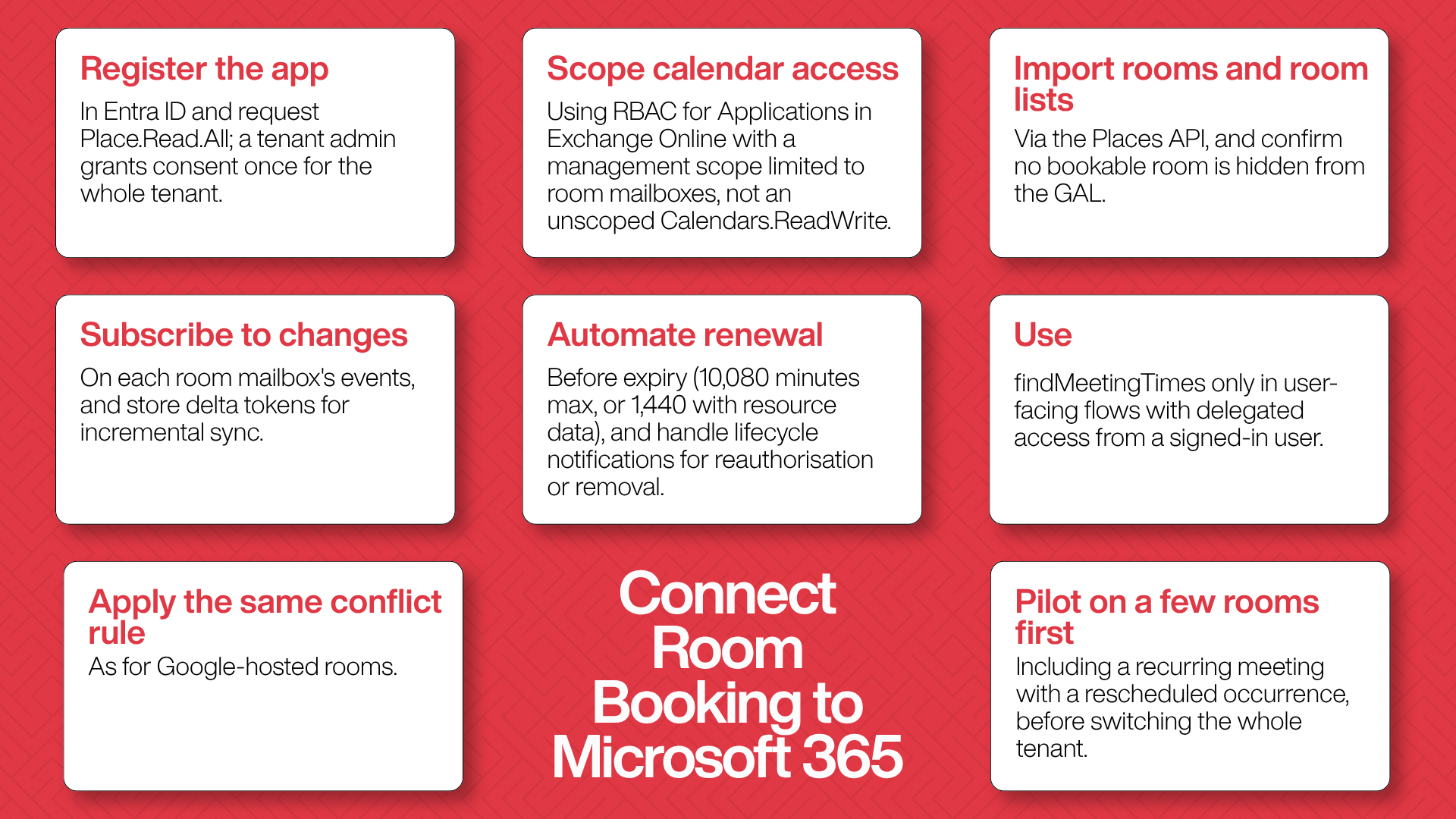
- Register the app in Microsoft Entra ID.
- Grant room inventory access. Request the Place.Read.All permissions and have a tenant administrator grant admin consent, a one-time, tenant-wide step.
- Scope calendar access to rooms only. Assign calendar read/write through RBAC for Applications in Exchange Online, using a management scope that matches room mailboxes, rather than an unscoped Calendars.ReadWrite grant that reaches every employee’s mailbox.
- Import rooms. Pull rooms and room lists through the Places API, and check that no bookable room is hidden from the GAL.
- Subscribe to changes. Create change-notification subscriptions on each room mailbox’s events and store delta tokens for incremental sync.
- Automate renewal. Renew each subscription before its 10,080-minute ceiling (1,440 minutes if notifications include resource data), and handle lifecycle notifications that signal a subscription needs reauthorising or has been removed.
- Use findMeetingTimes only in user-facing flows, where a signed-in work or school user supplies delegated access.
- Apply the same conflict rule used for Google-hosted rooms.
- Run a parallel test on a handful of rooms, including a recurring meeting with at least one rescheduled occurrence, before switching the whole tenant over.
Running Google Workspace and Microsoft 365 Side by Side
Plenty of organisations never choose between the two. They inherit both through mergers and acquisitions, or because different departments picked different tools years ago.
A platform built for this treats Google Calendar and Microsoft 365 as equally weighted data sources, not a primary system with the other bolted on. It keeps separate OAuth credentials and sync engines for each, while employees see one booking interface: Room A on the third floor books the same way whether its calendar lives in Google Workspace or Exchange Online.
The real risk in a mixed estate is a room that exists in both systems at once, an easy mistake mid-migration. The fix is architectural:
- Give every physical room exactly one authoritative calendar record, in one platform.
- Point the booking platform at that single source.
- Mark a room unavailable in the booking platform while it migrates, rather than leaving it bookable in two places.
Should You Build the Integration or Buy a Platform?
A two-way room booking integration is buildable in-house: Google’s and Microsoft’s calendar APIs are well documented and free to use. The real cost arrives after launch.
Factor | Build in-house | License a platform |
Best fit | Room data feeds something proprietary, such as a custom space-planning system | Employees need to book from either calendar without double bookings or lost recurring meetings |
Rough initial effort | A few weeks for one calendar platform in one office; several months for both platforms plus check-in, auto-release and analytics | Configuration and a pilot |
Ongoing work | Renewals on two schedules, recurring-meeting edge cases, API changes from both vendors | Maintained by the vendor; you govern scopes and access |
Hidden risk | A renewal job fails silently, and double bookings appear weeks later | A shallow “integration” that is really a one-time import |
Treat the effort estimates as a rough guide, not a quote. The decision usually comes down to one question: is your use of room data genuinely custom? If it is, build. If the requirement is simply reliable booking across both calendars, that’s a solved problem, and licensing a platform is almost always cheaper once QR check-in, auto-release, and analytics are counted.
Indian offices add another layer to the maths: connectivity that varies between cities and even floors, GST (Goods and Services Tax) invoicing, and procurement expectations that many US-built platforms don’t account for. Qudify’s guide to meeting room booking software for Indian offices covers those local factors in detail.
How to Tell a Real Integration From a Feature Checkbox
“We integrate with Google Calendar and Outlook” can mean anything from a one-time import to genuine two-way sync. Ask any vendor to show, not tell:
- True two-way sync: a booking made in Outlook or Google Calendar appears in the platform within seconds, and vice versa.
- Recurring-meeting handling: a single moved or cancelled occurrence is reflected correctly.
- QR or contactless check-in that confirms a booking actually became a meeting.
- Automatic no-show release, so a phantom reservation doesn’t hold a room all day.
- Utilisation analytics per room and across the organisation, not just a raw booking log.
- One dashboard for both calendars, treating Google and Microsoft backends as equals.
- Least-privilege access, with calendar permissions restricted to room calendars.
- Branding and interface customisation consistent with your organisation’s identity.
Common Room Booking Integration Failures and How to Fix Them
Symptom | Likely cause | Fix |
Bookings appear in the app but not in the calendar | Missing or expired write permission | Re-authorise with the correct scope and confirm token refresh is running |
Two bookings land on the same slot | Gap between the change notification and the incremental fetch | Tighten processing and renewal, and enforce a documented conflict rule |
Room shows booked in the app but free in the calendar after a reschedule | A recurring-meeting exception wasn’t tracked | Track occurrence-level exceptions, not only changes to the series |
Real-time updates suddenly stop | A watch channel or subscription expired without renewal | Automate renewal on each platform’s schedule and alert on failures |
Rooms look “always full” despite low attendance | Phantom bookings | Add QR check-in with a short grace period before auto-release |
Integration breaks when an administrator resets a password | Built on a personal user’s credentials | Rebuild on a service account (Google) or app registration (Microsoft) |
Teams can’t see each other’s room availability | Two separate booking silos | Move to one booking layer across both calendar platforms |
A Microsoft 365 room never appears in the platform | Room hidden from the GAL | Unhide it in Exchange, then re-import rooms |
Security and Governance Checks Before Go-Live
Calendar data is more than logistics. It reveals who is meeting whom, when leadership is in the building, and which teams are working on what, so the security posture of a room booking integration is a governance question, not a footnote.
Before launch, confirm that:
- Scopes cover calendars and free/busy only, never broader mail, contacts, or file access.
- Calendar access is restricted to room calendars, through tightly scoped domain-wide delegation on Google and RBAC for Applications on Microsoft 365.
- Tokens are stored encrypted, refreshed automatically, and revocable immediately when an employee leaves or a device is compromised.
- IT reviews connected applications on a fixed schedule and removes grants from abandoned tools.
- Regulated organisations in healthcare, finance, or government contracting obtain evidence of SOC 2 (System and Organization Controls 2) or ISO/IEC 27001 certification, plus a signed data processing agreement.
- Personal data obligations are mapped: the GDPR (General Data Protection Regulation) for people in the EU, and India’s DPDP Act (Digital Personal Data Protection Act, 2023) for personal data such as attendee names and email addresses processed in India. Qudify’s overview of the laws that now govern Indian front desks explains how the DPDP Act applies to workplace systems.
The risk isn’t hypothetical. Between 8 and 18 August 2025, a threat actor tracked by Google Threat Intelligence Group (GTIG) as UNC6395 used compromised OAuth tokens tied to the Salesloft Drift third-party app to export data from customers’ Salesforce instances. GTIG told The Hacker News it was aware of more than 700 potentially impacted organisations. None of them had handed credentials to the attacker; the access came through a trusted integration’s tokens. A room booking integration holding calendar permissions has a smaller blast radius than a CRM (customer relationship management) connector, but the mechanism is identical.
How to Roll Out a Room Booking Integration Without Losing Adoption
A technically flawless integration can still fail at the adoption stage if the rollout is rushed.
- Pilot with a few high-traffic rooms, not the whole building, so sync issues surface with a small blast radius instead of a company-wide complaint thread.
- Involve IT before facilities. OAuth consent and admin approval usually sit with IT, and delays there are a frequent launch bottleneck.
- Tell employees the conflict rule before launch, so anyone who books directly in Outlook or Google Calendar knows which booking will stand.
- Set check-in and release thresholds deliberately. Too aggressive frustrates people running a few minutes late; too lenient does nothing for phantom bookings. On Teams panels, changes to auto-release settings can take up to 48 hours to apply, so adjust them outside busy periods.
- Review utilisation after 30 days, not before. Early data is skewed by novelty and doesn’t reflect steady-state behaviour.
How Qudify Fits Into a Google and Outlook Room Booking Setup
Qudify’s QR-based meeting room and desk booking platform is built for the layer native calendars leave open. It connects with both Google Workspace and Microsoft Outlook calendars and sends calendar invites automatically when a room is booked, so employees keep booking from the calendar they already use.
On top of that connection, Qudify adds the pieces neither calendar provides without extra hardware or licences:
- QR check-in at the room door, with no-show cancellation that returns the room to the pool if nobody scans in time.
- Instant booking from a phone: scan a room’s QR code to claim an empty room for an ad hoc meeting.
- A tablet room display app that shows ongoing and upcoming bookings and carries a QR code for walk-up booking.
- An admin dashboard covering room usage trends, peak hours and meeting volume, plus amenities tracking for each room.
- A white-labelled interface that carries your organisation’s own branding.
- Visitor self check-in, so guests without a company calendar account move through the same QR-first flow. Qudify’s guide to managing office visitors digitally explains how that flow works, and the visitor management page covers the product.
Synced booking data is also the raw material for the decisions in Qudify’s meeting room utilisation analytics playbook: which rooms to keep, shrink or repurpose. As with any vendor, ask for a live demonstration of the hard cases before you commit: a booking made directly in Outlook, a moved occurrence of a recurring meeting, and a no-show release. You can book a Qudify demo here.
The Bottom Line
A room, a calendar entry and a person who actually shows up: that’s the whole promise of room booking technology, and most organisations still get one of the three wrong. Google Calendar and Outlook solved the first mile years ago, since adding a room to an event and letting it accept or decline works on either platform. What neither solves alone is the last mile: knowing whether a booking became a real meeting, keeping two calendar ecosystems in agreement, and giving facilities teams data they can act on.
That last mile is where OAuth scopes, sync tokens, notification renewals, and conflict rules stop being backend plumbing and become the difference between a booking system employees trust and one they route around. Get it right, and the booking app disappears into the background, the way good infrastructure should: people walk in, and the room is exactly as available as the calendar said it would be.
Frequently Asked Questions
Can I book a meeting room directly from Google Calendar without a separate app?
Yes. Once a Google Workspace administrator has set up rooms as resource calendars, you add the room to an event, and it accepts or declines based on availability. What you don’t get natively is QR check-in, attendance-based auto-release, or a single view across Google and Microsoft calendars.
Does Outlook support room booking without Microsoft Teams Rooms hardware?
Yes. Room mailboxes and room lists work in standard Outlook on any Microsoft 365 plan with configured room resources. Check-in, auto-release, and QR booking on the Microsoft side come from Teams panels or Microsoft Places, which add hardware and licensing requirements.
What is the difference between a Google Calendar resource and an Outlook room mailbox?
A Google Calendar resource is a calendar with its own email address, managed in the Admin console and the Admin SDK Directory API. An Outlook room mailbox is an Exchange Online mailbox carrying structured metadata such as capacity, building, floor, and equipment, which integrations read through the Microsoft Graph Places API. Both accept or decline invitations automatically, but they are provisioned and queried through different APIs.
Why do double bookings still happen with calendar integration?
Usually because of a sync gap: the time between a booking being made and the other system learning about it. Push notifications plus incremental sync shrink that gap, expired notification channels widen it, and a documented conflict rule settles the rare case where two bookings land seconds apart.
Can one room booking platform manage rooms across both Google Workspace and Microsoft 365?
Yes. The platform keeps separate authenticated connections and sync engines for each backend and presents one booking interface. The key safeguard is giving every physical room exactly one authoritative calendar record, in one platform.
What permissions should a room booking integration request?
Only what the feature needs: read and write access to room calendars and free/busy lookup. On Google Workspace, authorise domain-wide delegation for a minimal, named set of scopes. On Microsoft 365, read rooms with Place.Read.All, and scope calendar access to room mailboxes using RBAC for Applications in Exchange Online, rather than a tenant-wide Calendars.ReadWrite grant.
How does a room booking system prevent no-show bookings?
It requires check-in by QR scan, app, room panel, or occupancy signal, and releases the room automatically if nobody checks in within a set window, often around 10 minutes after the start time. Google’s native room release acts only when guests decline, so it can’t catch meetings people accepted and then skipped.
Is Microsoft's findMeetingTimes available for all Outlook accounts?
No. Microsoft documents it for delegated access on work or school accounts only. Personal Microsoft accounts and app-only (application) permissions aren’t supported, so a background service can’t call it without a signed-in user.
How long do Google Calendar push channels and Microsoft Graph subscriptions last?
A Google Calendar watch channel has a default time-to-live of 604,800 seconds (seven days) and must be replaced with a new channel before it expires. A Microsoft Graph subscription on Outlook events can last up to 10,080 minutes (under seven days), or 1,440 minutes when notifications include resource data, and is extended by renewing it before expiry.
Does integrating room booking with Google Calendar or Outlook mean replacing our calendar system?
No. The booking platform reads from and writes to your existing Google Workspace or Microsoft 365 calendars through their official APIs. Employees keep using the calendar they already know, with booking, check-in, and analytics layered on top.