
How to Manage Office Visitors Digitally: A Practical 2026 Guide
Key Takeaways
- Managing visitors digitally means running one consistent flow: pre-register, check in, notify, log, check out instead of an improvised script at the desk.
- The paper logbook fails at the exact moment it’s needed: an audit, a fire drill, or a security review. A digital log is searchable in seconds.
- QR check-in on a visitor’s own phone removes the two biggest friction points: queues and shared surfaces without a kiosk or badge printer.
- Host notifications decide whether the system actually gets used. In India, a WhatsApp alert clears a visitor faster than a buried email.
- Under India’s DPDP Act, your front desk is a data-collection point. Consent, data minimisation, and retention limits are now legal obligations, not nice-to-haves.
- Hardware is a choice, not a requirement. Kiosks and printers add cost and maintenance; smartphone-based check-in avoids both for most offices.
- Start with one workflow; usually scheduled meetings prove it for a week, then expand to walk-ins, contractors, and multi-location rollout.
A visitor is standing at your reception. The receptionist is on the phone. The sign-in book is open to a page where the previous guest’s name, company, and mobile number are on full display. The visitor writes their details, the receptionist finishes the call, walks over to the host’s desk to say someone has arrived, and by then the meeting is already five minutes late.
Multiply that by every client, candidate, courier, and contractor who walks through the door in a week, and a small operational detail turns into a recurring drag on the front desk. Then a real test arrives: a fire drill, a security review, or a compliance auditor asking for a list of everyone on-site last Tuesday. The paper register, the thing that was supposed to answer exactly that question, turns out to be nearly useless. Handwriting is illegible, pages are missing, and nobody signed out.
Managing office visitors digitally solves this, but not in the way most articles suggest. It isn’t about buying a shiny tablet for the lobby. It’s about running the same visitor process every single time, so that the record is accurate, the host is notified instantly, and the data is handled the way the law now expects. This guide walks through how that actually works: the workflow, the technology choices, the compliance obligations that apply in India, and how to roll it out without turning your reception upside down.
What Does It Mean To Manage Office Visitors Digitally?
Managing office visitors digitally means replacing the paper logbook and the manual phone call with software that handles a visitor’s entire journey from the invitation before they arrive to the check-out after they leave. Instead of writing in a book, a visitor registers on a form (often by scanning a QR code on their own phone), the system logs the entry with a timestamp, the host gets notified automatically, and every visit becomes a searchable record rather than a line of handwriting.
Put simply, a visitor management system digitises and automates every step of a visitor’s journey from pre-registration and identity verification to check-in, host notification, and eventual check-out. The important word is consistent. A digital system doesn’t invent a new visitor policy; it applies the one you’ve already defined, reliably, every time. That reliability is the whole point. Manual processes work fine at low volume and quietly fall apart as traffic grows.
The Digital Visitor Management Workflow, Step By Step
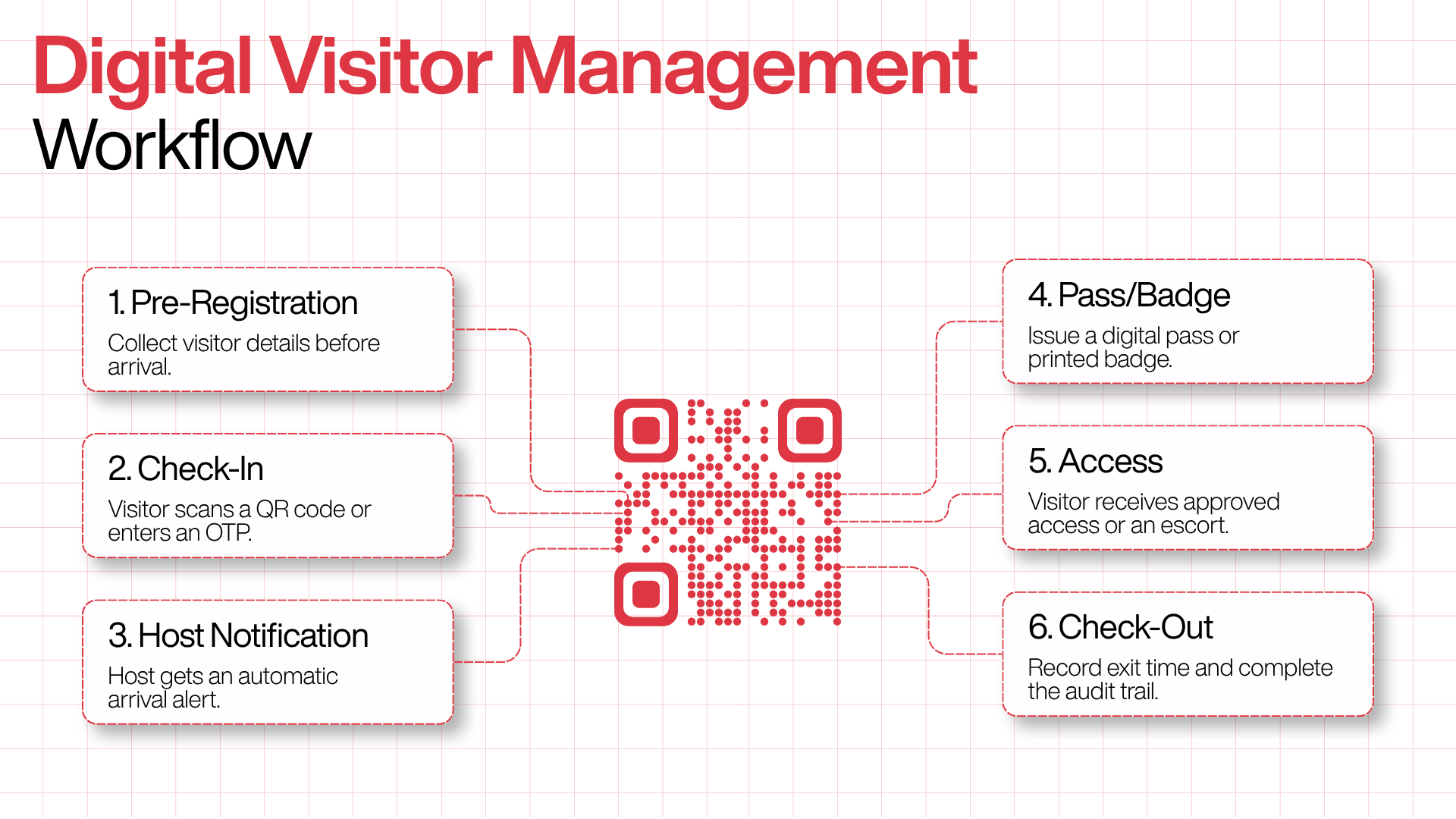
Almost every credible system, regardless of brand, runs on the same underlying sequence. The steps stay the same: pre-registration, check-in, notification, access, and check-out, and what changes is how reliably each one happens. Here’s what each stage looks like in practice.
1. Pre-registration (before arrival).
The host or admin enters the visitor’s details ahead of time, or the visitor fills in a short form via a link. Pre-registration lets you collect information, confirm details, and complete required steps before anyone arrives on-site so issues surface early, not at the front desk. For scheduled meetings, this is where most of the friction disappears: the data entry happens before the visitor ever leaves their own office.
2. Arrival and check-in.
On arrival, the visitor confirms their identity, typically by scanning a QR code or entering an OTP sent to their phone. If they pre-registered, the details they already entered are saved, and that part of the check-in is skipped: a scan, a tap, done.
3. Host notification.
The moment check-in completes, the host is alerted. The notification arrives automatically via email, Slack, or Microsoft Teams no phone call from reception, no missed arrivals. In the Indian workplace, WhatsApp is often the fastest channel of all.
4. Pass or badge issuance.
A badge prints automatically, or a digital pass appears on the visitor’s phone. Which one you need depends on your security posture; more on that below.
5. Access and escort.
Security or reception directs the visitor based on their pre-approved access level. In higher-security environments, this stage can connect to door hardware; in a typical office, it’s simply the host coming to collect their guest.
6. Check-out and logging.
Exit time is recorded automatically, completing the audit trail. This is the stage manual systems almost always miss: people forget to sign out, which is exactly why “who is still in the building?” is so hard to answer on paper.
The reassuring part for anyone worried about complexity: the core workflow stays consistent whether you’re running a single-door office or a multi-building campus. Hardware integration and access-rule complexity grow with the environment; the underlying process doesn’t.
Digital Visitor Management Vs. A Paper Logbook Or Excel Sheet
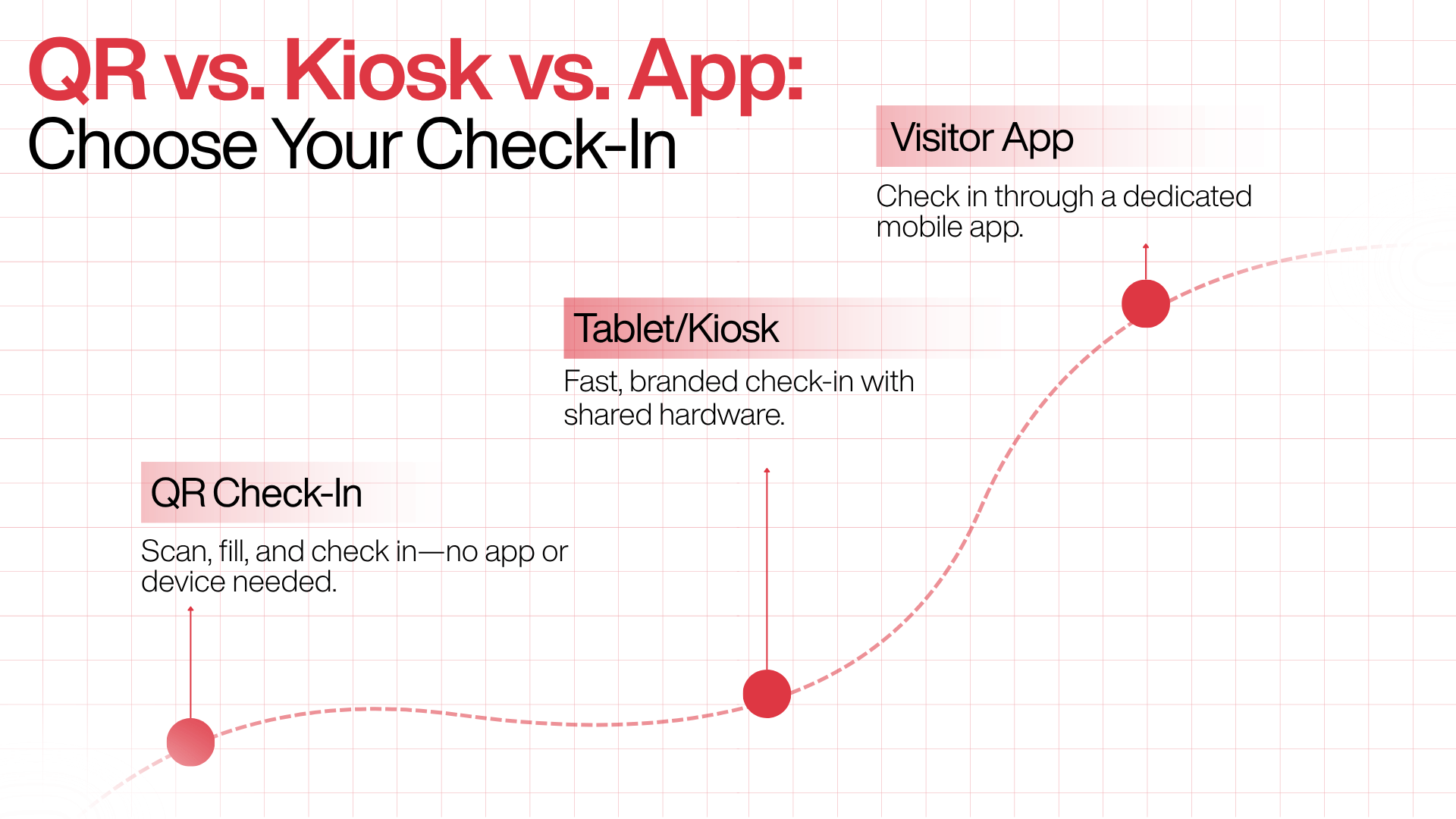
This is where the generic advice gets lazy, so let’s be concrete. There are three common ways for a visitor to check in, and they suit different offices.
QR code on the visitor's own phone.
The visitor scans a code, either a static one at reception for walk-ins, or a personalised one sent ahead of a scheduled visit, and completes a short form in their mobile browser. There’s no account and no download; the phone camera opens a browser form, and that single detail does most of the work for adoption. Because there’s no shared tablet, there’s no queue at a single device and no shared surface to touch. Asset-light QR check-in has become the default for Indian SMEs; tablet kiosks and badge printers are options, not requirements.
Tablet or kiosk at reception.
A mounted iPad or kiosk guides visitors through the sign-in flow. It looks polished and works well for high-footfall lobbies with a branded welcome experience, but it introduces a shared device (a hygiene and queueing consideration) and hardware to buy, mount, and maintain.
Dedicated visitor app.
Some systems use an installable app. It can offer the richest features, but requiring a download is a real adoption barrier for one-time visitors who won’t install software for a single meeting.
For most offices, the honest recommendation is to start with QR-based check-in on the visitor’s phone. It’s the lowest-friction option for the visitor and the lowest-cost option for you. Kiosks and printers can be layered on later if a specific need justifies them: a reception that wants a manned, branded desk experience, or a site that mandates printed photo badges.
Do You Actually Need Printers, Kiosks, And Badges?
Short answer: usually less hardware than vendors suggest. Every piece of hardware you add is a piece of hardware someone has to buy, install, power, update, and eventually replace, and that total cost of ownership rarely shows up on the first quote.
Printed badges make sense when your security or compliance rules require a visible, photo-bearing identifier think regulated manufacturing, data centres, or buildings with strict floor-by-floor access.
For a typical corporate office where the host walks down to collect their guest, a digital pass on the visitor’s phone does the same job without the printer, the label stock, or the jam at 9:05 a.m. The same logic applies to kiosks: a mounted tablet is a genuinely nice touch for a staffed, high-traffic lobby, and unnecessary overhead for a small or mid-sized office where visitors are already holding a perfectly good check-in device.
The principle is simple: decide what your security posture and visitor experience genuinely require, then buy only that. Hardware should follow a requirement, not precede one.
Handling Ndas, Id Checks, And Visitor Documents
For a lot of offices, check-in isn’t only about a name; it’s about getting the right agreement signed before the visitor goes any further. Contractors, interview candidates, and vendors often need to accept an NDA or a site-safety declaration, and doing that on paper means a clipboard, a scramble to file it, and no reliable link between the document and the visit.
A digital flow folds this into check-in. The visitor reviews and signs required documents from their own phone before or on arrival, and the signed copy is attached to their visit record automatically no separate filing, no lost forms. Identity checks (a photo, or an ID/KYC step) can sit in the same flow where your security posture calls for it. Two things are worth getting right here.
First, keep the document step proportionate: ask for an NDA where there’s genuinely sensitive information on the floor, not reflexively for every guest. Second, and this is a common compliance trap, signing an NDA is not the same as consenting to have personal data processed. As the next section explains, under India’s DPDP Act you need both, captured separately.
Managing Visitor Data Under India's DPDP Act

Here’s what almost no international “how to manage visitors” article tells an Indian reader: your reception desk is a regulated data-collection point, and the rules have teeth.
Every day, your front desk gathers names, phone numbers, company details, purpose of visit, and often a face photo or ID from every person who walks through your doors, and under India’s Digital Personal Data Protection Act, 2023, every one of those people is a Data Principal with enforceable rights. The uncomfortable part: the way most organisations run visitor management today a tablet app, a paper register, or an informal sign-in sheet is almost certainly not DPDP-compliant, not because the technology is wrong, but because the consent, notice, retention, and deletion practices around it weren’t designed with the law in mind.
A few practical obligations to build into your process:
Consent and notice: Under the DPDP Act, consent is the primary legal basis for processing personal data. Valid consent has to be free, specific, informed, unconditional, and unambiguous, shown through a clear affirmative action, which means it can’t be bundled into an NDA or implied by a pre-ticked box. And to repeat the trap from the last section: signing an NDA is consent to the NDA’s terms, not consent to data processing; you need both.
Data minimisation: The Act requires you to collect only the data actually necessary for the stated purpose, and this one is genuinely useful beyond compliance. Collecting an email “just in case” when you already have the phone number and the visit is a one-off is likely a minimisation violation; if a field isn’t used, remove it. Fewer fields also means faster check-in, so privacy and experience pull in the same direction here.
Retention and deletion: Keep visitor records only as long as you need them, then delete them. In practice, that means consent at collection, role-based access so only the right staff see records, encryption in transit and at rest, and a retention policy that deletes records when you no longer need them.
On timelines and “certified” claims, get the facts right: The DPDP Rules were notified in November 2025, and the main compliance provisions consent, privacy notice, and security requirements become effective on 13 May 2027. There is no official “DPDP-certified” software label. Judge a system on how it handles data residency, consent capture, retention controls, and audit logs, not on a compliance badge, because no such badge yet exists.
One structural advantage worth understanding: a digital system makes these obligations operational rather than aspirational. A well-designed VMS makes it easy to search for, export, or delete a visitor’s data on request, which is precisely what a paper register can never do.
Beyond Check-In: The Data You Didn't Know You Were Missing
A digital front desk quietly produces something the logbook never could: usable information about how your space is actually used. Once every visit is a structured record, you can see peak arrival times, which teams host the most guests, how long visits typically run, and how often expected visitors actually show up.
For administrators, this turns the front desk from a cost centre into a source of operational insight. Real-time visitor data supports better decisions about staffing the reception, managing space, and even planning security coverage around known busy periods. None of this requires extra effort from anyone; it’s a by-product of running check-in digitally. It’s also the kind of capability that’s easy to overlook when comparing systems on their check-in screens alone, and easy to appreciate the first time a facilities lead asks, “how many people do we actually have coming through here?”
How To Roll Out Digital Visitor Management Without Disrupting The Front Desk
The most common mistake is trying to digitise every visitor type on day one. Don’t. The advice that consistently works: start with one workflow, then expand once the team feels the difference.
Here’s a sensible sequence:
- Start with scheduled meetings: These are the easiest win because pre-registration does the heavy lifting: hosts invite guests in advance, and arrivals are fast and predictable.
- Add walk-ins: Introduce a static QR code or reception flow for unscheduled visitors once the scheduled path is running smoothly.
- Layer in contractors and couriers: These often need slightly different fields or approval steps; add them once the basics are stable.
- Extend across locations: For multi-site organisations, roll the proven process out office by office, with location-level admin controls so each site manages its own settings.
Set your data practices up at the same time, not later: configure which fields you collect (only what you need), your consent notice, and your retention period on day one. Retrofitting compliance is far more painful than building it in from the start.
The payoff arrives quickly. This is one of the few operational upgrades where the difference is visible inside a week: a calmer lobby, cleaner records, and hosts who actually know when their guests have arrived.
What To Look For When Choosing A System
If you’re evaluating options, weigh them against how offices actually run rather than the length of the feature list. The factors that tend to matter most:
- Check-in friction for the visitor: Can a first-time guest check in without downloading anything? Every extra step costs you adoption.
- Host notification channels: Email, Slack, Teams, WhatsApp does the alert reach hosts where they’ll actually see it? A notification nobody reads is the same as no notification.
- Pre-registration: Can hosts invite guests ahead of time and move the data entry before arrival?
- Hardware dependency: Does it require kiosks and printers, or are those optional? This directly affects your total cost of ownership.
- Document handling: Can visitors sign NDAs or declarations digitally, with the signed copy attached to the visit record?
- Audit trail and real-time on-site list: Can you see who’s in the building right now and export records for an audit in seconds?
- Data handling: Consent capture, configurable fields, retention controls, role-based access, and (for Indian organisations) data residency.
- Multi-location administration: If you have several sites, can each be managed independently under one system?
- Analytics: Does it turn visit records into usable insight about footfall and space use?
- Support that understands your context: Responsiveness and channels matter, and for Indian workplaces, so does a team that understands local language, workflow, and compliance realities rather than operating at a global distance.
How Qudify Approaches Digital Visitor Management
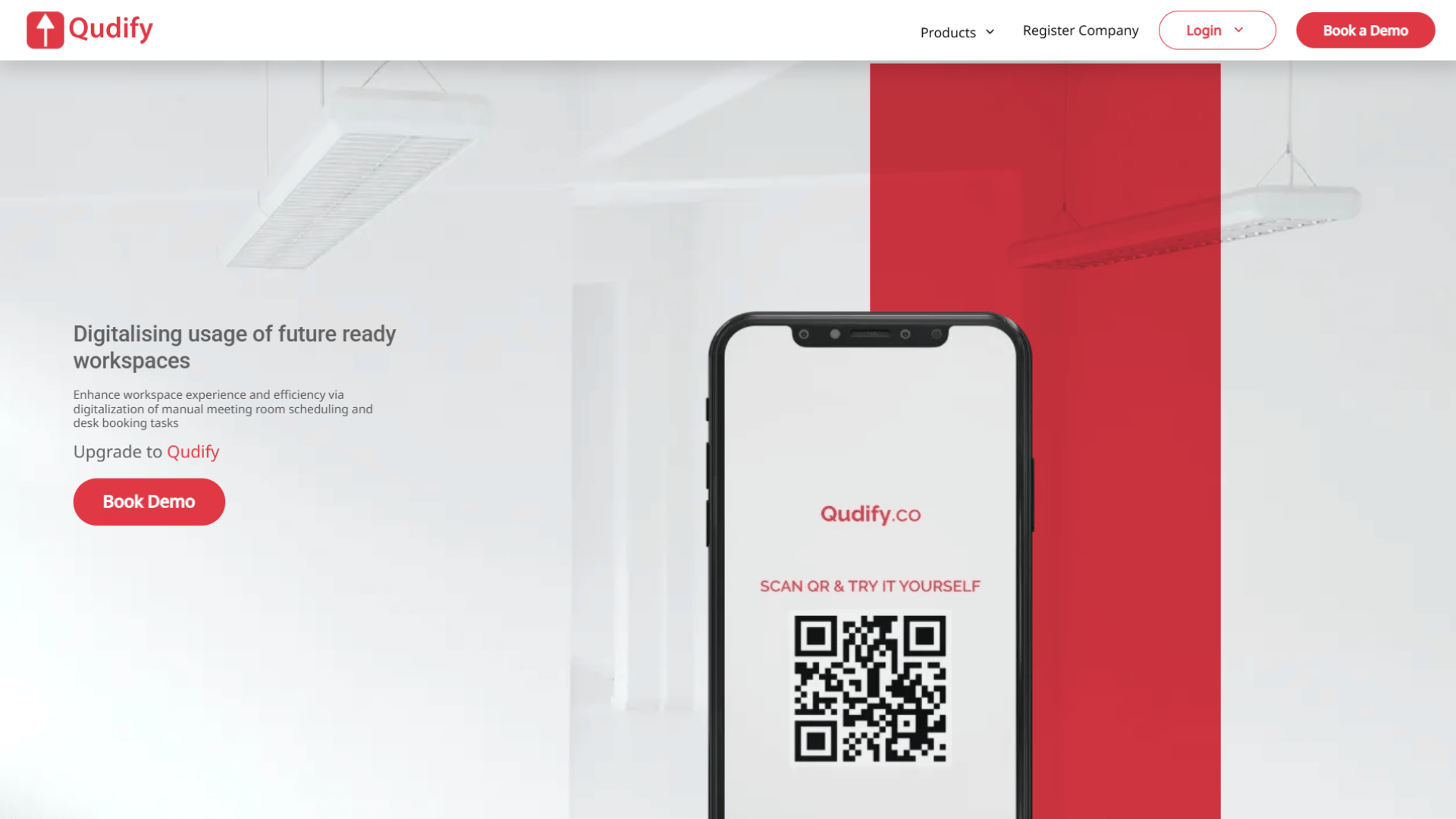
Qudify is built around a specific point of view: for most offices, the visitor’s own smartphone is the only “hardware” you need. Rather than a kiosk-and-printer setup, Qudify runs an asset-light, QR-based flow: visitors scan a QR code on their own phone to check in and out, with no app to download, no badge printer, and no dedicated tablet at the desk. Hosts approve and get alerted over WhatsApp, which in the Indian workplace is usually the fastest way to clear a visitor at the door.
The rest of the flow maps directly onto the workflow described above.
- Hosts can pre-invite specific visitors and generate passes ahead of time, including VIP passes for expected guests, so scheduled arrivals are quick.
- Each visitor receives a digital pass carrying a QR code that a verification team can scan to confirm it’s authentic and valid, which replaces the printed badge for offices that don’t need one.
- Check-in forms are customisable, so you collect the fields you actually need (name, company, purpose, and so on) and, usefully for DPDP data-minimisation, leave out the ones you don’t.
- For multi-location organisations, office-wise admin access lets each site control its own permissions, and analytics turn the resulting visit records into a picture of how your space is used.
In the interest of a fair comparison: Qudify’s current version does not integrate with external physical access-control systems, so if your priority is tying visitor check-in directly to door hardware and turnstiles, that’s a gap worth raising with the team about their roadmap. For the large majority of offices where the goal is a fast, contactless, compliant, hardware-free front desk and a reliable digital record, that’s rarely the deciding factor.
Conclusion
Managing office visitors digitally isn’t really a technology decision; it’s an operational one that technology happens to enable. The systems that succeed aren’t the ones with the longest feature lists; they’re the ones that make the right thing happen automatically every time: the visitor checks in without friction, the host finds out instantly, the record is accurate, and the data is handled the way the law now requires.
If you take three things from this guide, make them these. First, prioritise adoption over features: a low-friction check-in (ideally on the visitor’s own phone) and a host alert that actually reaches people will do more for you than any advanced module nobody uses. Second, buy only the hardware your security posture genuinely demands; for most offices, that’s far less than the standard kiosk-and-printer pitch assumes. Third, treat visitor data as regulated data from day one, because under the DPDP Act it is.
For Indian offices in particular, the sweet spot is a hardware-free, QR-based, WhatsApp-first approach that keeps the front desk fast and the compliance story clean, which is precisely the problem Qudify was built to solve. But whatever you choose, the test is simple: does it turn your reception from an improvised, paper-bound scramble into a calm, consistent, verifiable process? Get that right, and the front desk stops being something you manage and starts being something that manages itself.
Frequently Asked Questions
How do you manage office visitors digitally?
Replace the paper logbook with a visitor management system that runs one consistent flow: pre-register the visitor, let them check in on arrival (typically by scanning a QR code on their phone), automatically notify the host, issue a digital pass, and log the check-out. Every visit becomes a timestamped, searchable record instead of a line of handwriting.
What is the best way to keep track of office visitors?
A digital visitor management system, because it logs every check-in and check-out in real time and lets you see exactly who is on-site at any moment. Paper logbooks and spreadsheets can’t restrict who reads the data, can’t notify hosts, and can’t be searched quickly during an audit or emergency the moments the record matters most.
Is a digital visitor system worth it for a small office?
Often, yes, and it doesn’t have to be expensive or hardware-heavy. If you’re handling more than a few dozen visitors a week, or you have any compliance or security expectations, a QR-based system that uses the visitor’s own phone removes queues and shared surfaces without a kiosk or printer. Start with one workflow (scheduled meetings) and expand from there.
Do I need a tablet kiosk or badge printer?
Usually not. Printed badges make sense only when security or compliance rules require a visible photo identifier. For a typical office where the host collects their guest, a digital pass on the visitor’s phone does the same job. Treat kiosks and printers as optional upgrades justified by a specific need, not defaults.
How does QR code check-in work?
The visitor scans a QR code with their phone camera, which opens a short form in the mobile browser no app or account needed. They submit their details, the system logs the entry and issues a digital pass, and the host is notified automatically. For scheduled visits, a personalised code sent in advance skips the form entirely. The whole interaction typically takes under a minute.
How should visitor data be handled under India's DPDP Act?
Your front desk collects personal data, so DPDP obligations apply. Collect consent through a clear, specific notice (separate from any NDA), gather only the fields you genuinely need, restrict access to authorised staff, encrypt records, and delete them per a defined retention policy. Note that the main compliance provisions take effect on 13 May 2027, and no official “DPDP-certified” software label currently exists; evaluate systems on their actual data controls.
Can visitors sign an NDA during check-in?
Yes. Most digital systems let visitors review and sign an NDA or site-safety declaration from their own phone, and the signed copy is attached automatically to that visit’s record. Remember that signing the NDA covers the agreement itself; you still need separate consent to process the visitor’s personal data.
Can a digital system tell me who is in the building right now?
Yes, that’s one of its biggest advantages over paper. Because check-ins and check-outs are logged in real time, you can pull an up-to-date on-site list from any device in seconds, which is invaluable during a fire drill, security review, or emergency.
How long does it take to roll out?
Faster than most expect. Because the visitor-facing part requires no hardware or downloads for a QR-based system, you can often go live for scheduled meetings within days, then progressively add walk-ins, contractors, and additional locations. The operational difference shorter queues, instant host alerts, clean records is usually noticeable within the first week.