
Access Control Integration with VMS: A Step-by-Step Guide
Key Takeaways
- “VMS” is ambiguous, and the ambiguity mis-scopes projects. It means Visitor Management System in facilities contexts and Video Management System in the surveillance industry. Both integrate with access control. Confirm which one your RFP means before anyone quotes.
- Integration is three operations: provision a credential at check-in, stream door events back, revoke automatically when the visit ends.
- Automatic revocation is the whole ballgame. Everything else is configuration.
- Four connection methods native connector, REST API, PIAM middleware, file sync differ by an order of magnitude in cost, speed, and risk.
- Wiegand undoes good software. A perfectly scoped digital pass is theatre if the reader still transmits the card number in plain text.
- Integration complexity, not budget, is the top barrier to identity projects (52%, per HID’s 2026 research).
- Multi-tenant towers have two access control systems and two owners. Sort out who is the Data Fiduciary before you sort out the API.
- Nobody owns this project by default. IT owns the API, Security owns the doors, Admin owns the front desk. Name one accountable person, or it stalls.
Most buildings already own both halves of the system. A visitor management system at the front desk records who is walking in. An access control system decides which doors actually open. In most buildings, the two have never spoken to each other.
The result is a gap you can physically walk through. A visitor registers digitally. A guard then pulls a plastic card from a drawer and hands it over. Nobody records which card. Nobody takes it back. The digital log says the visitor left at 4:00 PM. The card in their pocket still opens the third-floor door on Saturday night.
Integrating access control with a visitor management system means three things:
- the visitor’s check-in automatically creates a credential in the access control system,
- door events flow back into the visitor log, and
- the credential dies on its own when the visit ends.
Everything in this guide is in service of that third point.
What follows: the architecture, the four ways to connect the systems, the protocol constraint that decides whether the connection is actually secure, a ten-step implementation sequence, what it costs, and who has to own it.
What Does "VMS" Mean in an Access Control Project?
This is not pedantry. It is the single most common cause of a mis-scoped security purchase.
Visitor Management System governs people at the entrance: pre-registration, host approval, ID capture, consent, screening, digital passes, and the entry-exit audit trail. It answers who is allowed in, why, and for how long. This is where Qudify operates, and it is the subject of this guide.
Video Management System governs cameras and footage: live view, playback, analytics, retention, evidence export. It answers what actually happened at that door. Milestone XProtect, Genetec Omnicast and Avigilon Control Centre sit here.
The Division of Labour
Access control is the connective tissue both plug into:
- Visitor Management decides WHO.
- Access Control enforces the DOOR.
- Video Management proves WHAT HAPPENED.
A visitor system integrates with access control to issue and revoke. A video system integrates with access control to correlate. Build only one of those links, and you have half a system. Steps 1-8 below build the first link. Step 9 bolts on the second.
New to the category entirely? Start with our primer on what a visitor management system is and why every Indian office needs one in 2026.
Why Integrate at All?
What Breaks Without It
An unintegrated front desk fails in a specific way: it verifies identity, then hands over an anonymous key.
The mechanism is tailgating. In an industry survey reported by SecurityInfoWatch, 48% of respondents said they had experienced a tailgating violation, and around 70% believed a breach at their own facility due to tailgating was somewhat to very likely. The cost estimates are blunt: per the Security, Resiliency & Technology Integration Forum, 41% of security executives put the cost of tailgating somewhere between $2 million and “too high to measure”.
The deeper problem is that physical access defeats digital defence. A stranger sitting at an unlocked desk renders a great deal of expensive network security decorative.
The India Stake
Two clocks are running.
Breach cost: IBM’s Cost of a Data Breach 2025 put India’s average organisational breach cost at ₹220 million (about USD 2.51 million), an all-time high, roughly 13% above 2024.
Regulation: The DPDP Rules were notified on 14 November 2025 with an eighteen-month phased implementation. Shardul Amarchand Mangaldas maps three enforcement dates: 14 November 2025, 14 November 2026, and 14 May 2027, when substantive obligations bite. Penalties run to ₹250 crore.
Visitor data name, phone, photograph, ID, purpose, and now a movement history across your building is squarely personal data. The un-integrated model collects more of it (photocopied IDs) while proving less about it (no consent record, no retention policy, no exportable log). Integration lets you invert both.
What the Market Is Doing
Genetec’s 2026 State of Physical Security Report, drawn from 7,368 respondents across six regions, found more than 70% now run unified or integrated systems, and 60% say their main reason for replacing legacy technology is to integrate new capabilities. Genetec’s VP of Product Engineering, Christian Morin, frames the shift by observing that “security is emerging as a genuine enabler of business outcomes”.
On the identity side, HID’s 2026 State of Security and Identity Report found 73% rank identity management as their top priority and 74% have deployed or plan to deploy mobile credentials, but 52% name integration complexity as the primary barrier. HID CTO Ramesh Songukrishnasamy describes the winning approach as “giving stakeholders meaningful solution choice while maintaining robust security.” In other words: the appetite is there, the wiring is the problem.
The two markets are converging from different scales. Mordor Intelligence sizes the visitor management market at USD 2.39 billion in 2026, reaching USD 4.22 billion by 2031 (12.05% CAGR). MarketsandMarkets puts access control at roughly USD 10.62 billion in 2025, reaching USD 15.80 billion by 2030 (~8.3%). Access control is bigger, slower, and hardware-heavy. Visitor management is smaller, faster, and software-native. The integration layer is where they meet.
In India, the pressure is physical. JLL recorded a record 83.3 million sq ft of gross office leasing in 2025, with Global Capability Centres taking a 37.7% share. Every one of those floors is a new set of doors, turnstiles and daily visitor flows.
Caveat worth stating plainly: HID and Genetec both publish vendor-run industry surveys, not independently audited studies. Read them as directional signals of where budgets are moving.
How Does the Integration Actually Work?
What Happens at Run Time
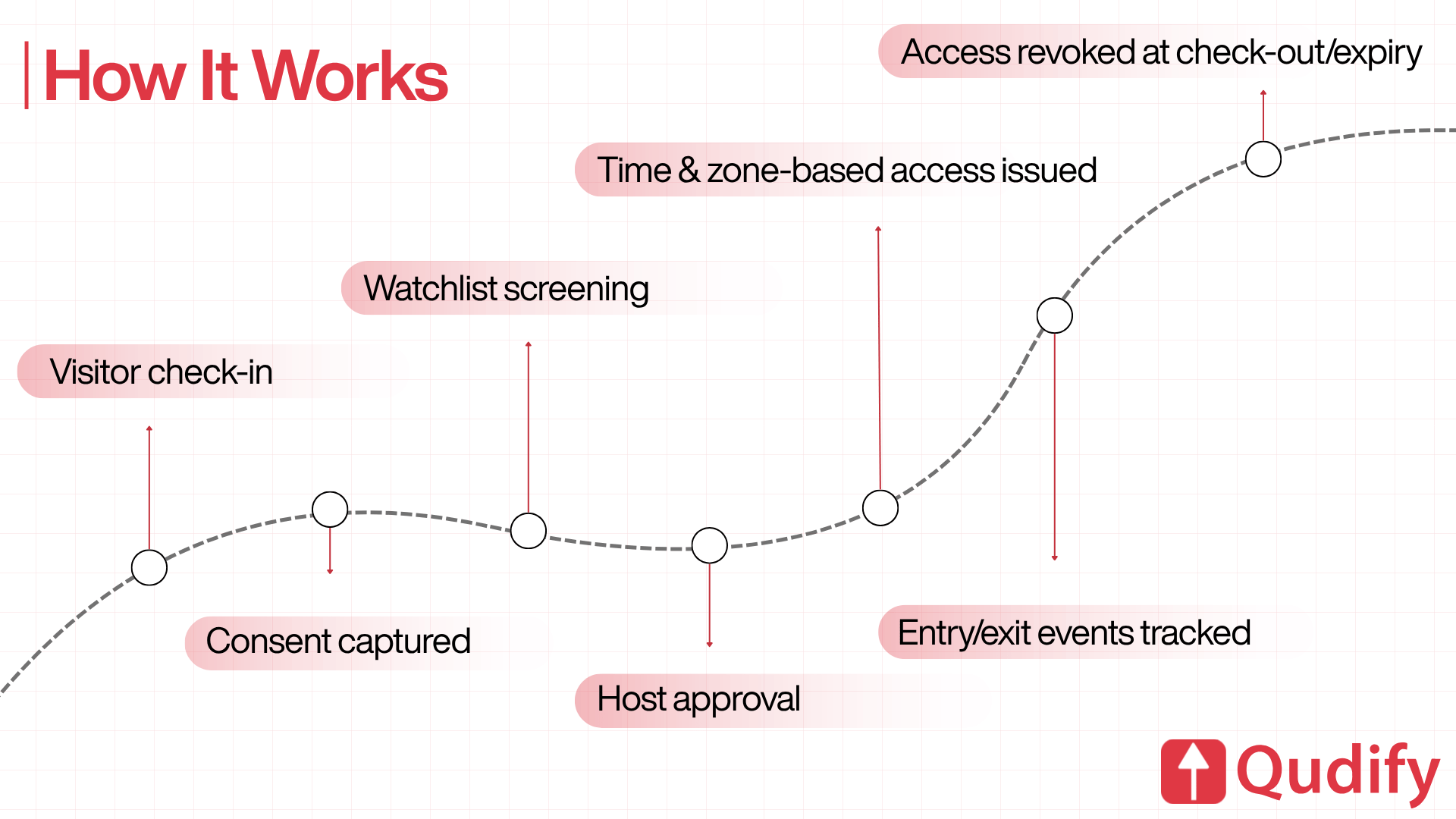
Seven stages, of which only three are new engineering.
- Visitor pre-registers or arrives and checks in.
- Consent is captured and recorded.
- Screening runs against watchlists.
- Host approves.
- The VMS calls the access control system and provisions a credential, scoped to specific zones and a specific time window.
- Door events stream back into the visitor record as the visitor moves.
- The credential is revoked on check-out, on timeout, or manually.
Stages 1-4 already happen inside any competent visitor system. Stages 5–7 are what integration buys: a credential that is enforceable at the door, observable in the log, and self-terminating. Envoy describes the same pattern: check-in triggers credential distribution based on predefined permissions, and badge events flow back for occupancy visibility.
What Is a "Credential," Exactly?
This trips up almost every first-time integration, so be precise. Inside a physical access control system (PACS), three distinct objects are usually involved:
- The cardholder record: the person. Name, ID, photo.
- The credential: the token (card number, mobile ID, QR payload) bound to that cardholder.
- The access group/access level: the permission set that says which doors, on which schedule.
Your integration must create or update all three, and revoke at least the credential. A common failure is provisioning the credential but never touching the access group, so the visitor exists in the system and can open nothing. The reverse failure deleting the cardholder but leaving an orphaned credential live is worse.
What Are the Four Ways to Connect the Systems?
Method | How it works | Time to deploy | Risk |
Native/certified connector | Pre-built by one or both vendors | 3–7 days | Low |
REST API + webhooks | Your VMS calls the PACS API; PACS pushes events back | 2–6 weeks | Medium |
PIAM middleware | A broker sits between many VMS and many PACS, enforcing policy centrally | 1–3 months | Medium (high cost) |
File/database sync | Scheduled CSV drops or direct database writes | Days | High |
File sync deserves a warning: it is not real-time, it is hard to secure, and it breaks silently. Treat it as a bridge with an expiry date, never as an architecture.
Wiegand, OSDP and ONVIF: The Protocol Layer That Decides Security
Above the API, everything is software. Below it, physics takes over, and this is where most “integrated” systems are quietly insecure.
Wiegand has connected readers to controllers since the 1980s. It is unencrypted, transmits in plain text, is one-way only, cannot supervise the reader for tamper or failure, and imposes distance limits. A card number sniffed off a Wiegand line can be replayed trivially.
OSDP was developed by the Security Industry Association to replace it. It is a two-way command-response protocol over RS-485, became an international standard (IEC 60839-11-5) in 2020, and, with Secure Channel, uses AES-128 encryption so data is never transmitted the same way twice. Two wires instead of six-plus, multi-drop support for anti-passback, cable runs to 4,000 feet. SIA recommends broad adoption, particularly in high-security and government settings.
ONVIF handles cross-vendor interoperability. Profile A covers access control configuration credentials, access rules, and schedules. Profile C covers door control and event management. Profile D covers peripherals. Access control systems use Profiles A, C, D, and M; video systems use D, G, M, S, and T. One caveat: conformance supports interoperability for the specified profile features but does not guarantee two devices from different manufacturers will work together perfectly. Verify against the ONVIF Conformant Products List, then test anyway.
Step-by-Step: Integrating Access Control With Your Visitor Management System
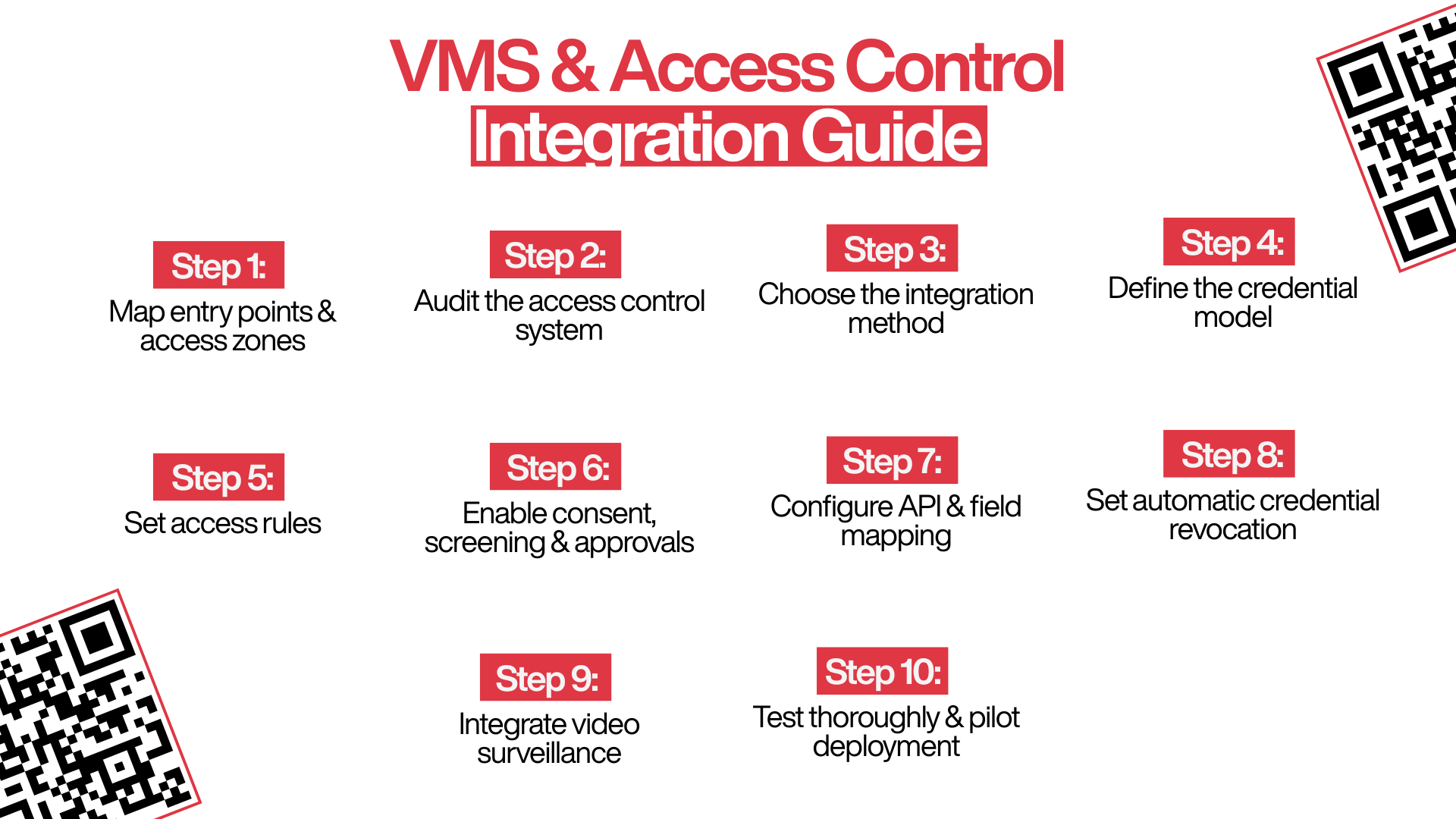
Step 1: Map Entry Points and Access Zones
Walk the building with a floor plan. Record every controlled point: lobby turnstiles, lift lobbies, floor doors, server rooms, labs, warehouses, parking barriers, service entrances.
Then group them into access zones: sets of doors sharing one permission. “Ground floor public.” “Floor 4 tenant.” “Data centre.” “Loading bay.” Most buildings need four to ten. If you are designing thirty, you are listing doors, not zones.
Step 2: Audit the Access Control System
Five facts, and vendors are often vague about all five.
What to find out | Why it decides the project |
Controller make, model, firmware | Old firmware often means no API at all |
Reader-to-controller protocol | Determines whether the credential is secure in transit |
API availability and documentation quality | An “API” that is really a database schema is not an API |
Cardholder capacity and credential format | Some panels cap active credentials; visitors churn fast |
Cloud-managed or air-gapped on-premise | Cloud panels integrate in days; air-gapped may need middleware |
Ask for the API documentation before you sign anything. If it cannot be produced within a week, that is your answer.
Step 3: Pick the Integration Method
A decision tree, in order. Stop at the first yes.
- Does a native connector exist for your exact PACS version? → Use it.
- Does your PACS expose documented credential create/revoke endpoints plus a webhook or polling mechanism? → Build the API integration.
- Multiple sites, multiple PACS vendors, complex approval policy? → PIAM middleware.
- None of the above? → File sync, with a written replacement deadline.
Record which you chose and why. That document is what you will argue with in month six.
Step 4: Design the Credential Model
What does the visitor physically present at the door?
- QR on the visitor’s own phone: nothing to issue, nothing to return, nothing to lose. Needs QR-capable readers or turnstiles. This is the model Qudify is built around.
- Mobile credential (Apple/Google Wallet, BLE/NFC): excellent experience, needs compatible readers and usually a per-credential licence.
- PIN / one-time code: cheap, works with keypads, weakest.
- Temporary physical card familiar to guards, and reintroduces every problem you are trying to solve.
Plan for a mixed estate, not a clean cutover: HID found 84% of end users still maintain physical credentials alongside their mobile deployment. Your access rules must handle both.
Step 5: Write the Access Rules
Most integrations get lazy here and create one catch-all “VISITOR” level that opens everything. Build a matrix instead.
Visitor type | Zones granted | Time window | Escort |
Meeting guest | Lobby, lift lobby, host’s floor | Appointment ± 60 min | No |
Interview candidate | Lobby, HR floor only | Appointment ± 30 min | No |
Contractor/ vendor | Lobby, service lift, one work zone | Shift window | Yes, in restricted zones |
Delivery/courier | Lobby, loading bay only | 15 min from check-in | No |
Auditor / VIP | Broad, pre-approved by security head | Full-day | No |
Long-term consultant | Staff zones minus restricted | Contract end date | No |
Turn on anti-passback while you are here. This is the rule that actually addresses tailgating, and it is almost always left off. Anti-passback prevents a credential being used to enter twice without an intervening exit read, so a card cannot be passed back through the turnstile to a second person.
Pair it with physical enforcement speed gates, one-person-per-credential turnstiles, mantrap vestibules and, in high-consequence zones, occupancy sensors that count bodies against badge events. Integration alone makes tailgating visible. These rules are what make it stop.
Step 7: Configure and Field-Map the Link
- Generate API credentials in the PACS scoped to the minimum permissions needed: create credential, revoke credential, read events. Never an admin account.
- Map fields explicitly: visitor_id → cardholder_id, access_zone → access_group, valid_from/valid_until → activation_date/deactivation_date.
- Configure the webhook endpoint, or the polling interval if the PACS cannot push.
- Add retry logic with exponential backoff, and a dead-letter queue for permanent failures.
- Alert on failure; do not merely log it.
Field mapping is where integrations rot. A firmware update renames a field, provisioning starts failing, and nobody notices for a week because the failures went into a log file nobody reads.
Step 8 Wire Up Revocation
This is the step that separates a real integration from a demo. Configure three independent triggers, because relying on one of them means relying on the visitor’s cooperation.
- Check-out. Visitor scans out; the credential dies immediately.
- Timeout. The visitor never scans out; this is the normal case, not the exception. The credential expires at valid_until regardless. Make this a hard stop, not a warning.
- Emergency revoke. Security can kill any active visitor credential across every door, from one screen, instantly.
Then answer the auditor’s question before the auditor asks it: can you produce a list of every currently active visitor credential, right now, in under a minute? If you cannot, your revocation logic is not trustworthy. Build that report before go-live, not after.
Step 9: Add the Video Layer
Two capabilities carry most of the value:
- Event-linked video: every badge event automatically retrieves the clip from that door at that timestamp. Investigations stop involving manual timeline scrubbing.
- Video-verified access at unstaffed or high-security entrances: an operator views a live feed before releasing the door remotely.
This is where “VMS” flips to its other meaning, and where ONVIF Profile A and C conformance start earning their keep.
Step 10: Break It, Then Pilot It
Do not test the happy path. It works. Test these:
- The internet drops mid-day. Does the gate fail open, fail closed, or freeze — and have you decided which of those you want?
- The PACS API returns a 500 on provisioning. Is the visitor stranded at the turnstile with no fallback?
- The same visitor is registered twice, by two hosts, on the same day.
- A visitor checks in and never checks out. Does the credential expire on schedule?
- Fire alarm. Do all doors release, and does the VMS produce a live muster list of everyone currently inside? This is the one your safety officer will actually care about, and it is the strongest single argument for integration in the entire business case.
- A visitor’s phone battery dies before they reach the reader.
Then pilot one entrance for two weeks before touching the rest of the building. Every organisation that skipped the pilot discovered its edge cases in production, usually during an evacuation drill.
Finally, train the guards and publish a one-page visitor access policy. The integration is only as good as the person authorised to override it.
The Multi-Tenant Problem Nobody Warns You About
If you are in an Indian commercial tower, this section matters more than everything above it.
There are two access control systems, not one. The landlord or facility management company owns the ground-floor turnstiles and the base-building PACS. The tenant owns their floor doors and frequently runs a completely different PACS. Neither party controls the full path from street to desk.
That produces three architectures, and only one of them works:
- Landlord-only VMS. Tenants get no visitor data and no control over who is cleared to their floor.
- Tenant-only VMS. The lobby turnstile has no idea the visitor exists, so your pre-registered guest still queues at the ground-floor desk. This is the most common and most infuriating configuration.
- Federated. The landlord’s VMS provisions base-building access, the tenant’s VMS provisions floor access, and the two exchange the visitor record. The visitor scans once and walks through both.
Before the API conversation, have the contract conversation. Under DPDP, who is the Data Fiduciary for that visitor’s personal data, the landlord or the tenant? In most Indian leases today, this is simply unaddressed, which means both parties are exposed, and neither has a documented basis for retention or erasure. Get it written into the lease or facility agreement, along with who honours an erasure request and who holds the audit log.
Qudify runs a distinct product line for commercial towers precisely because the tenant-of-a-tower problem is structurally different from the single-occupier office problem.
Diagnostics: Symptom → Root Cause → Step You Skipped
What you’ll actually see | Root cause | Go back to |
Visitor cleared at reception, stuck at the turnstile | Provisioning call failed, and nobody was alerted | Step 7 |
The active-credential list keeps growing | No timeout trigger; revocation depends on the visitor checking out | Step 8 |
A visitor pass opens a door it should not | One catch-all “VISITOR” access group | Step 5 |
Guards keep overriding the system manually | No documented fallback, so they invented one | Step 10 |
Provisioning silently stopped working last Tuesday | Field mapping drifted after a firmware update | Step 7 |
You cannot answer “who is in the building right now?” | Door events are not streaming back from the PACS | Step 7 / Step 9 |
Legal asks for one visitor’s data and you cannot isolate it | No retention policy, no deletion mechanism | Data section, below |
Step 8 Wire Up Revocation
Measure these before you integrate, or you will have no way to prove the project worked.
KPI | Target after integration |
Check-in to door-open time | Under 60 seconds, end to end |
Orphaned credentials (active past expiry) | Zero |
Manual guard interventions per day | Falling week on week |
Anti-passback/tailgating events | Counted, not suspected |
Failed provisioning calls | Under 1% of check-ins |
Time to export a full audit log | Minutes, not a day of digging |
Data, Consent and Securing the Link

Collect Less
Integration is your chance to collect less, because you no longer need a paper trail as a fallback.
Collect | Skip |
Name, phone, host, purpose, timestamp | Full ID document photocopies |
Consent record with timestamp and language | Aadhaar numbers rarely defensible for a one-hour meeting |
Photograph, where genuinely justified | Home address |
Company, vehicle number where relevant | Anything you cannot name a deletion date for |
The test is one sentence: for every field you capture, can you state the purpose and the deletion date? If not, remove the field. Photocopying Aadhaar cards at the gate does not make a building safer; it makes it a data breach with a lobby.
Retain Less
- Bounded retention. Pick a policy (90 days is a reasonable starting point for routine office visits) and let the system enforce it automatically.
- Erasure. Requests must be honoured within the timelines the Rules set.
- Exportable audit logs. If a regulator asks who entered Floor 6 in March, “we have a register somewhere” is not an answer.
No government “DPDP-certified” label exists. When a vendor claims compliance, ask how. Our fact-checked comparison of visitor management systems in India works through vendor evaluation in detail.
Secure the Link Itself
The API between VMS and PACS is now security infrastructure. It can open doors.
- TLS in transit, encryption at rest.
- Scoped, rotated API keys. Never an integrator’s personal account.
- Signed webhooks; otherwise, anything that can reach your endpoint can request a door to be opened.
- Anomaly alerting: bulk credential creation, provisioning outside business hours, spikes in failed calls.
What Does It Cost, and Who Owns It?
The Cost Structure
Anyone who quotes a single number before knowing your door count, controller make, and reader protocol is guessing. What you are actually buying:
- VMS subscription per site, per user, or per visit.
- Connector or integration licence one-time or annual, if you are using a native connector.
- Engineering days if you are building against the API.
- Reader/hardware upgrade only if you want QR or mobile credentials and your readers cannot do them, or you are migrating Wiegand to OSDP. Cost these two separately; they are separate decisions.
- Middleware licence for PIAM, and it is usually the largest line item.
- Commissioning and training.
- Ongoing key rotation, firmware regression testing, and the runbook nobody budgets for.
The Ownership Question
IT owns the API and the network. Security owns the access rules and the doors. Facilities and Admin own the front desk. HR owns consent. Nobody owns the integration, which is exactly why these projects stall in month two.
Name one accountable owner before Step 1 and hand them a runbook covering four questions: who rotates the API key, who is paged when provisioning fails, who approves a new access zone, and who signs off the retention policy.
The 10 Questions to Put in Your RFP
- Which access control systems do you have a production connector for? Name the versions.
- Show me the API documentation for credential creation and revocation now, not after signing.
- What happens to an active visitor credential if the visitor never checks out?
- Can I revoke every active visitor credential across all doors from one screen? Demonstrate it.
- Does the credential work on my existing readers, or do I need new hardware?
- Where is visitor data stored, and in which country?
- What is the default retention period, and can I change it?
- Can I export a complete audit log without raising a support ticket?
- What happens when the internet drops, and what does the guard do in that hour?
- Under DPDP, who is the Data Fiduciary for this data: you or me? Point me to the clause.
How Qudify Approaches Access Control Integration
Qudify is a QR-first visitor management system built by Qdesq Realtech, running across 500+ live sites for 400+ client organisations (company-reported figures, not independently audited). The design constraint is deliberate: the only hardware required is the smartphone the visitor already owns.
That has three consequences for the integration described above.
There is no card to hand over, and none to chase: The pass is a QR code on the visitor’s own phone. Provisioning is a software event, and expiry is a software event, so Step 8’s hardest operational problem getting the physical object back simply does not exist to be solved.
Approvals happen over WhatsApp: The Step 6 screening gate stops being a bottleneck, because the host does not have to be at a desk, in an app, or anywhere near the building for a visitor to be cleared.
Consent, retention, and audit are by-products of the check-in, not a separate compliance project. Because the flow is digital end-to-end, the consent record, the retention clock, and the exportable log are generated as the visit happens.
Which architecture is right for your building still depends entirely on Step 2: what your access control system actually supports. That is a conversation worth having before anyone signs anything. Book a 15-minute walkthrough, and we will work through the integration path for your specific PACS.
The Bottom Line
The API calls are not the hard part. The hard part is a set of decisions: which zones exist, what each visitor type may open, how long a credential lives, what happens when the network drops, who owns the data in a shared building, and how little you can get away with collecting.
Get those right, and the technology follows in weeks. Get them wrong, and you have automated a broken process at speed.
Start with Step 1. Walk the building. At every controlled door, ask whether a visitor should ever be standing behind it and whether you would currently know if they were.
Working through a specific PACS integration? Talk to the Qudify team about your entry points, your controllers and your DPDP timeline.
Frequently Asked Questions
Who should own an access control integration project internally?
One named person with authority across IT, Security and Facilities. In practice, the most successful owner is usually the Head of Admin or Facilities, with a security lead and an IT lead formally assigned to them because the front desk is where the process actually lives, even though the API lives in IT.
Can one visitor management system integrate with several different access control systems across sites?
Yes, and this is the normal case for any multi-site organisation. If the PACS vendors differ by site, you are choosing between building separate API integrations per site or deploying PIAM middleware once. The tipping point is usually around four to five sites, or two or more distinct PACS vendors.
Do I need ONVIF conformance if I am integrating over a REST API?
No. ONVIF matters when you need device-level interoperability across manufacturers: a reader from one vendor working with a controller from another, or a video system pulling standardised access events. A direct REST API integration between your VMS and one PACS does not depend on it. Ask about ONVIF when your estate is genuinely mixed-vendor.
Does this same integration handle employees, or only visitors?
Both, and most buyers miss this. The provisioning mechanism that issues a temporary visitor credential is the same mechanism that issues a joiner’s credential on day one and revokes a leaver’s on their last day. If you are already building the link, extend it to the HR system, and you close the ex-employee-still-has-access hole at the same time.
Do I need to replace my card readers?
Only if one of two things is true: you want QR or mobile credentials and your current readers cannot read them, or you want the credential encrypted between reader and controller, and you are currently on Wiegand. Those are separate decisions with separate budgets; do not let a vendor bundle them into one number.
How is a QR-based visitor pass secured against someone screenshotting and forwarding it?
By making it single-use or time-bound, cryptographically signed, bound to one visitor record, and scoped to specific zones and a specific window. A static QR that anyone can forward is not a credential; it is a picture. Ask any vendor which of the two they are selling you.
What is the difference between integration and unification?
Integration means two systems exchange data through an API layer somebody has to build and maintain. Unification means the data was never separated: one database, one interface, one policy engine. Unification is cleaner where a single vendor covers everything. Integration is the pragmatic reality for almost everyone, because almost nobody gets to rip out working access control hardware.
How do I prove ROI to a CFO who sees this as a security cost?
Three numbers travel well: front-desk hours saved per week, the count of orphaned credentials you eliminated on day one (this figure is almost always shocking and it is free to produce), and time-to-produce an audit log for a compliance request. Security teams tend to argue risk. CFOs buy the second and third numbers.