
How QR Code-Based Check-In Works: A Practical Guide for Office Managers
Quick answer: QR code-based check-in is a digital visitor sign-in method where guests scan a code with their phone camera, fill in a short form in the mobile browser, and get logged into a visitor management system that instantly notifies their host. The entire interaction usually takes under a minute. The paper register disappears, and in its place, you get an accurate, timestamped, searchable record of every person who has walked through your door.
Key Takeaways
- QR check-in runs on a four-stage workflow: pre-registration, arrival scan, host alert, and digital badge. The paper logbook disappears.
- Visitors do not download anything. The phone camera opens a browser form. That single detail does most of the work for adoption.
- Two QR variants exist in practice. Static codes sit at the reception for walk-ins. Dynamic, personalised codes are sent over WhatsApp or email before a scheduled visit.
- Under India’s DPDP Act 2023, the office is the Data Fiduciary, not the software vendor. Consent capture, retention limits, and access controls are your responsibility.
- The DPDP Rules were notified in November 2025, with substantive obligations enforceable from 13 May 2027. That 18-month runway is the cleanest window to standardise a compliant check-in workflow.
- Asset-light QR check-in has become the default for Indian SMEs. Tablet kiosks and badge printers are options, not requirements.
The front desk is the part of your office every visitor experiences first, and for years, it has been run on a paper logbook and a chained pen. That setup quietly creates three problems any office manager will recognise. It slows the lobby to a crawl at peak hours. It openly hands one visitor’s contact details to the next person in the queue. And the moment it is actually needed, a fire drill, a security review, an audit, an incident, it is close to useless.
QR code-based check-in fixes all three using a device every visitor is already holding. It is one of the smaller upgrades you can make to your reception, and one of the few where the difference is visible inside a week. This guide walks through how it works, what to look for, and how to roll it out, written for the person who actually owns the front desk, not the IT lead.
What Is QR Code-Based Check-In?
QR code-based check-in is a digital visitor management process in which a guest scans a code at the entrance with their phone camera, completes a short form in the mobile browser, and is recorded automatically in the office’s visitor management system.
When the camera reads the code, the phone opens a check-in page. No app. No account. No download. The visitor enters whatever you have asked for, hits submit, and the system stores the entry, issues a digital or printed badge, and pings the host. On a well-built platform, the whole interaction is self-service and ends in well under a minute.
What really changes is where the data goes. Instead of a smudged line in a book, every visit lands in a secure, searchable record with a precise timestamp attached. That one change is what makes everything else worth having: live occupancy data, a clean compliance trail, faster lobbies, and a check-in flow that looks like your brand rather than a clipboard.
QR Code Check-In vs. Paper Logbook: A Quick Comparison
For office managers weighing the switch, the contrast is easiest to see side by side.
| Factor | Paper logbook | QR code-based check-in |
| Entry speed | One visitor at a time | Self-service, parallel |
| Hygiene | Shared pen and book | Contactless, own device |
| Record quality | Illegible, often incomplete | Structured and timestamped |
| Visitor privacy | Visible to the next guest | Private to each person |
| “Who’s here now?” | Manual headcount | Real-time dashboard |
| Emergency roll call | Slow, error-prone | Instant on-site list |
| Compliance trail | None to speak of | Full audit history |
| Ongoing cost | Cheap but limited | Low, mostly software |
How QR Code-Based Check-In Works: Step by Step
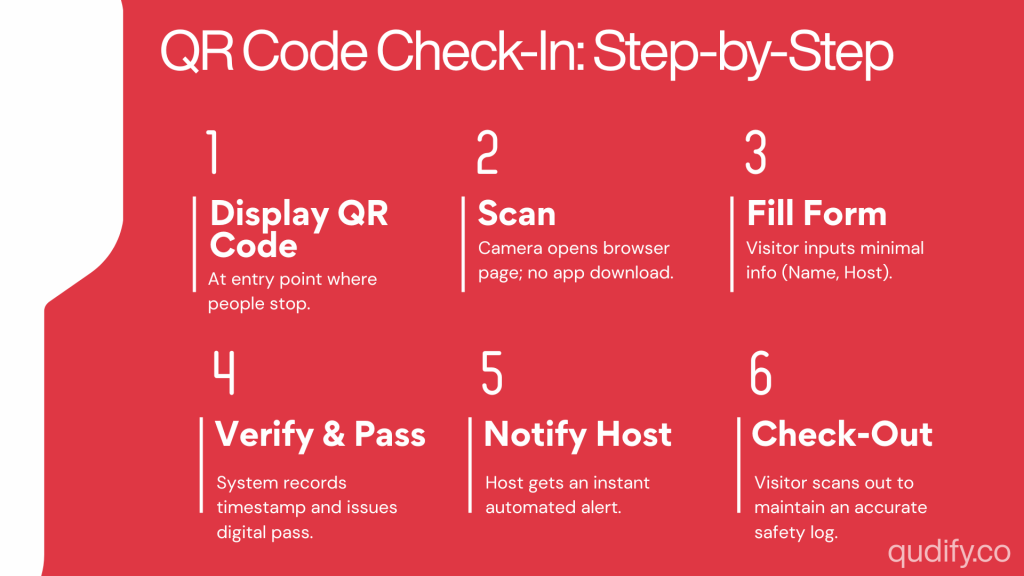
Here is exactly what happens from the moment a visitor walks in. Knowing each stage makes it easier to brief the reception and to spot where things break.
Step 1: Display the QR code at your entry point
The system generates a unique code for your office or one per location if you operate multiple sites. Print it and place it where arrivals naturally look: a reception counter, a standing sign by the door, or an A5 acrylic stand at eye level on the desk.
A practical rule from real deployments: position the code where a person is already standing still, not where they are still walking, and make sure it is well-lit. For multi-site businesses, each location gets its own code, so every check-in is automatically tagged to the right office without anyone thinking about it.
Step 2: The visitor scans with their phone
The guest opens their camera and points it at the code. The camera recognises it and opens the check-in page in the browser. No app. No login.
This “no download” detail is not a small convenience; it is the single biggest factor in adoption. Ask a first-time visitor to install software at your front door, and a meaningful share will simply give up and wait for a human to help them. The platforms worth shortlisting, Qudify included, deliberately stay browser-based for this reason.
Step 3: The visitor completes a digital check-in form
The page loads a short form you have configured in advance. You decide the fields. The usual ones are:
- Full name and company
- Phone number or email
- Host or department being visited
- Purpose of visit
- Any compliance items, health declaration, NDA acceptance, ID, or KYC details
Discipline matters here. Every field is a few more seconds of friction, multiplied by every visitor, every day. Collect what you will actually use, and nothing else. A form designed once a year by someone who never works the desk is the most common source of an unnecessarily slow lobby.
Step 4: The system verifies and issues a pass
On submission, the details land in your visitor management dashboard, and the visitor receives a digital badge or a printed pass if your setup includes a printer. This is also the step where verification rules apply: photo capture, ID checks, host approval, or a watchlist screening before access is granted.
Paper cannot compete here. The record is stored instantly, searchable, and tied to a precise timestamp. If your business operates in a regulated industry, such as financial services, healthcare, defence vendors, or regulated coworking, this is the step that transforms check-in from a politeness into an actual control.
Step 5: The host gets a real-time notification
The instant a guest checks in, the host is alerted automatically by email, app, WhatsApp, or workplace message. This is the step office managers tend to value most, because it removes a recurring chore.
Reception no longer has to phone around hunting for whoever the visitor came to see. The host walks out to greet their guest. The desk stays free. It is a small mechanic that takes a surprising amount of daily friction out of the lobby.
Step 6: Check-out closes the loop
When the visit ends, the guest checks out by scanning again, tapping a link in their email, or being signed out at the desk. Now the log shows who arrived, who has left, and who is still inside the building. That is the difference between a sign-in sheet and an actual safety tool.
Better systems auto-check out visitors after a set time, so stale entries do not skew your on-site count. A guest who forgot to scan out at 4 PM should not still appear “present” at 11 PM during a fire drill.
What if the scan doesn’t work?
It is worth planning for the visitor whose camera will not focus, whose phone battery is dead, or who does not carry a smartphone at all. A good setup keeps a simple fallback receptionist-assisted check-in on a shared device, or a short URL that the visitor can be walked through. The goal is not to force everyone through the same door; it is to make sure no one is stuck at yours. This also keeps the process accessible for older or less tech-comfortable guests, which matters more than most checklists admit.
Static vs Dynamic QR Codes: Which One Do You Actually Need
Most office managers do not realise there are two flavours of QR check-in until they start configuring a system. The difference matters for both security and visitor experience.
Static QR codes are printed once and live at your reception. They are universal: any visitor who scans them lands on your standard check-in form. They are perfect for walk-ins, regular contractors, and last-minute visitors. The trade-off is that everyone uses the same code, so the form does the work of identifying who the visitor is and why they are there.
Dynamic QR codes are generated for a specific person and a specific visit. The host pre-registers the guest, and a personalised code (or short link) is delivered by email or WhatsApp before they arrive. When the visitor scans it on the day, the system already knows who they are, who they are visiting, and what they have been approved for. Check-in becomes a confirmation, not a data-entry exercise.
In practice, most offices need both. Static codes handle the lobby in a steady state. Dynamic codes handle the calendar in advance.
Pre-Registration: How to Make Check-In Almost Instant
For any visit your team knows about ahead of time, you can skip most of the on-site steps. With pre-registration, the host invites the visitor in advance, and the guest receives their details, usually a personalised QR code or check-in link, by email before they arrive.
On the day, the visitor taps the link or scans on arrival, their information is already on file, and check-in is a matter of seconds. For interview panels, client meetings, vendor visits, and event days, this is what keeps the lobby calm during a rush. A simple rule: if a visit is scheduled, it should be pre-registered. The compounding effect across a year of visits is the difference between a reception that feels controlled and one that feels chaotic on Tuesdays.
What Office Managers Should Look For in a QR Check-In System
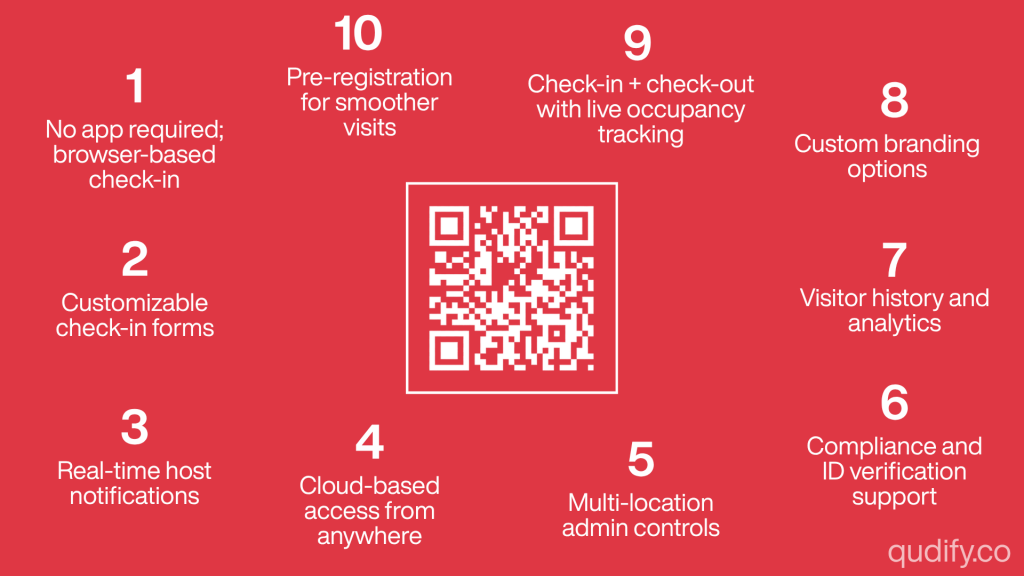
Not every platform is built the same. Match these features to how your office actually runs rather than to the longest feature list on a marketing page.
- No app required for visitors. Browser-based check-in removes the single biggest adoption barrier, full stop.
- Customisable check-in forms. You should be able to add, remove, and reorder fields yourself, without raising a support ticket.
- Real-time host notifications. Automatic alerts are what take reception out of the messaging business.
- Cloud-based access. Data should be current and reachable from anywhere, not trapped on a lobby tablet that someone has to remember to charge.
- Multi-location admin controls. Managing several sites means you want office-wise permissions so each location sees only its own data, while leadership sees the whole picture.
- Compliance and verification. ID checks, KYC, health declarations, and document acknowledgements matter in regulated industries.
- Visitor history and analytics. Footfall reporting helps you plan staffing and justify space decisions during lease renewals.
- Custom branding. The experience should look like your company, not a generic template.
- Check-out and live occupancy. Confirm the system tracks who has left, not only who arrived.
- Pre-registration support. This is what makes scheduled visits feel effortless.
Qudify was built around exactly this checklist QR and WhatsApp-based check-in with no app downloads, customisable forms, real-time host alerts, cloud access, and office-wise multi-location admin, which is why it suits both a single reception and a multi-site deployment without re-engineering.
What QR Check-In Actually Costs
Most platforms are priced on a monthly subscription, usually scaled by the number of locations or visitor volume rather than a big upfront licence. What pushes the cost up is optional hardware (a tablet kiosk, a badge printer) and add-ons like KYC verification or advanced analytics. What keeps it down is staying browser-based and skipping the kiosk entirely, which is precisely why asset-light setups have become the default for Indian SMEs.
The honest comparison isn’t software cost versus zero. It is the software cost versus the receptionist hours spent on manual sign-in, the risk of an incomplete record during an audit, and the cost of not knowing who is in the building. For most offices, the maths tips quickly, usually inside the first quarter.
A useful internal exercise before signing anything: count your average daily visitors, multiply by the average time your front-desk staff spends on each, and price that time. Compare it to a monthly subscription. The decision tends to make itself.
Where It Fits in Your Existing Setup
Check-in rarely lives alone. The platforms worth shortlisting connect to the tools you already run, so the front desk stops being an island.
- Messaging: host alerts route into email, WhatsApp, Slack, or Microsoft Teams, wherever your team actually looks.
- Calendars: Google Calendar or Outlook feed pre-registration, so a scheduled meeting can generate a visitor invite automatically.
- Access control: A successful check-in can release a door, gate, or turnstile in higher-security sites.
- HRMS and directory: Keeping your host list synced means an employee who leaves the company stops appearing as a selectable host the same day.
Before you commit, list the three or four systems your office cannot do without and confirm the platform talks to them. An integration you assumed was there, and isn’t, is the most common post-purchase regret.
Where QR Code Check-In Makes the Biggest Difference
The technology is flexible, but the payoff is most visible in a few settings.
- Corporate offices with steady client and candidate traffic that need a secure, professional front desk.
- Coworking and flexible workspaces where members and their guests move through the building all day.
- Multi-location enterprises that want one consistent check-in standard and centralised reporting.
- Schools and universities are managing parents, contractors, and visitors with a duty of care over a controlled campus.
- Events and high-volume days where a paper queue physically cannot keep up.
A simple test: if you cannot confidently answer the question “who is in this building right now?”, you are in the group that benefits most.
How to Roll Out QR Code Check-In in Your Office
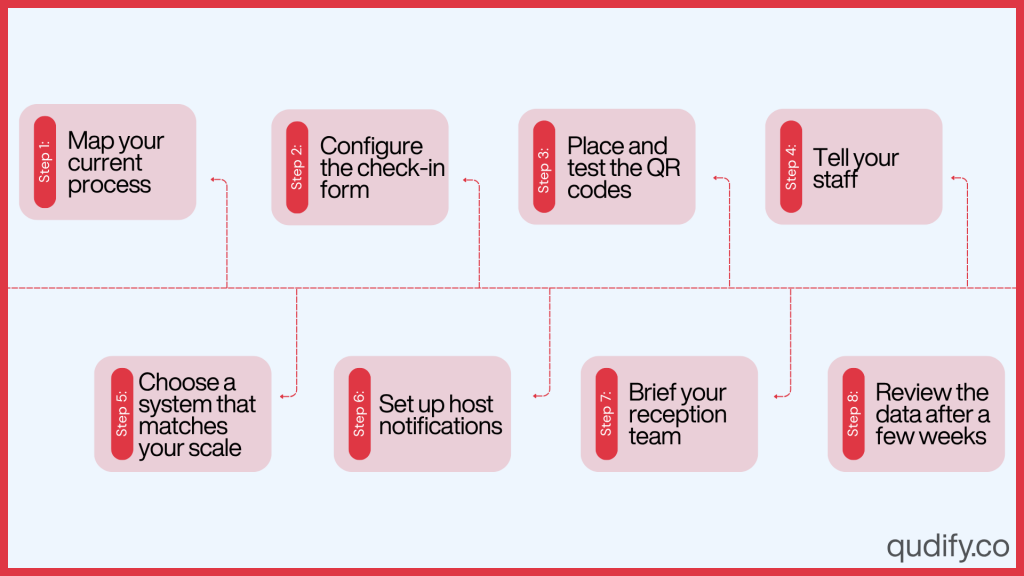
A clean launch is mostly preparation, not technology. The sequence below is the one most office managers settle into.
1. Map your current process. Note what you collect today, who needs to be notified, and any compliance rules. This becomes your form specification.
2. Choose a system that matches your scale. One office or many? Regulated industry or not? Buy for your reality, not a feature checklist.
3. Configure the check-in form. Keep it short. Add only the compliance fields you genuinely act on.
4. Set up host notifications. Confirm hosts receive alerts on a channel they actually watch. There is no point routing them to an inbox no one opens.
5. Place and test the QR codes. Position them at eye level where arrivals pause. Run a full check-in and check-out yourself before going live.
6. Brief your reception team. Their role shifts from data entry to hosting and exception-handling. It is a better job, but worth saying out loud so no one feels sidelined.
7. Tell your staff. Show employees how to pre-register guests so the system is used from day one.
8. Review the data after a few weeks. Use the analytics to refine fields, signage placement, and staffing around your actual peaks.
The most common rollout mistake is treating the QR code as the project. The project is the workflow around it. The code is just the visible bit.
QR Code Check-In, Security, and Compliance
For many office managers, speed is not the deciding factor. It is accountability. A digital system produces an audit trail that paper cannot complete: a timestamped record of who entered, who they came to see, when they left, and which policies they agreed to.
That record supports evacuation roll calls, security investigations, and compliance reporting. Because visitor data sits in an access-controlled system rather than an open book, you are protecting personal information instead of broadcasting it.
What the DPDP Act actually means for visitor management
If you are operating in India, this is the regulatory backdrop you cannot ignore. The Digital Personal Data Protection (DPDP) Rules, 2025 were notified by the Ministry of Electronics and Information Technology on 13–14 November 2025, with substantive obligations enforceable from 13 May 2027 and an 18-month implementation runway.
Under that framework, your office is the Data Fiduciary for the visitor data it collects. Your check-in software vendor is the Data Processor. The legal accountability for how the data is collected, retained, and erased sits with you, not them. Practically, that means:
- Consent must be informed and specific. A buried checkbox is not enough; the visitor needs to understand what is being collected and why.
- Retention should be purpose-bound. Visitor data should not sit in your dashboard for years because no one set a deletion rule.
- Access should be controlled. Not every employee needs to view the visitor log; admins should.
- Data subjects have rights. Including the right to erasure on request, with response timelines defined under the Rules.
A paper logbook fails all four of these tests on day one. A well-configured QR system can pass them by default. That is the real reason this transition matters now, not the convenience of skipping a clipboard, but the cost of being caught short when enforcement begins.
For multinational offices, the same logic applies under GDPR, with broadly similar principles around consent, retention, and access. A platform that handles one well usually handles the other.
Conclusion
QR code-based check-in is not a gadget. It is a quieter, faster, and more accountable way to run the front desk. Visitors get a one-minute, contactless arrival on their own phone. Hosts know the moment their guest walks in. And you finally get a clean, timestamped answer to the question every office manager has been asked at least once: who is in the building right now?
For office managers in India, the DPDP transition window makes this the right time to standardise on a workflow that is compliant by design rather than retrofitted later. Start small. Keep the form short. Let the data show you where to refine.
The hardest part of the switch is usually the decision to make it.
See It Running at Your Front Desk
If the reception you have just read about sounds like the one you want, the next step is short. Qudify gives you QR and WhatsApp check-in with no app downloads, configurable forms, real-time host alerts, and office-wise admin for multi-site setups live in an afternoon, not a quarter.
Book a 20-minute demo and see your own front desk on it.
Frequently Asked Questions
No. Visitors scan the QR code with their phone’s built-in camera, which opens a check-in form directly in the mobile browser. With systems like Qudify, there is nothing to install and no account to create, which is the single biggest reason adoption rates stay high.
Usually under a minute: scan, complete a short form, submit. Pre-registered visitors are often checked in within seconds because their details are already on file, and the system simply confirms their arrival.
Yes. Visitor data sits in a secure, access-controlled system rather than an open logbook, so it is never visible to other guests. Many platforms add verification layers such as ID checks, photo capture, host approval, watchlist screening, and KYC for regulated industries.
Very little. Most modern visitor management systems are cloud-based and asset-light, with a printed QR code at the entrance and an admin dashboard that is usually enough to get started. A badge printer or tablet kiosk is optional and depends on whether you want physical passes.
Yes. Each location can have its own QR code, and admins can apply office-wise permissions so each site sees only its own visitors while leadership gets a consolidated, cross-site view. Multi-location admin is one of the strongest reasons enterprises move off paper.
QR check-in happens on arrival, when a guest scans the code at the door. Pre-registration happens beforehand, when the host invites the visitor in advance, so the on-site step takes seconds. Most systems support both, and pre-registration is the standard for any scheduled visit.
The system sends an automatic real-time notification to the host the instant a visitor checks in by email, WhatsApp, Slack, or app notification. Reception never has to call or message anyone manually.
A well-built system supports compliance by storing visitor data securely, restricting access, capturing informed consent, and allowing configurable retention limits. Compliance ultimately depends on how you configure and operate it, but a digital system makes meeting those obligations far more practical than a paper logbook ever could.
Yes. Most platforms allow you to add your logo, brand colours, and a welcome message to the check-in page, so the experience feels like your company rather than a generic template. This matters more than it sounds the check-in page is often the first digital touchpoint a visitor has with your brand.
Good systems include a fallback receptionist-assisted check-in on a shared device, or a short URL that the visitor can be walked through. The QR flow is the default, not the only option.