
Office Security Best Practices for Indian Enterprises: The Complete 2026 Guide
Quick answer: Office security is the combined set of policies, processes, and technologies that protect a workplace’s people, premises, assets, and data from unauthorised access, theft, and safety incidents. For Indian enterprises in 2026, the single most effective first step is replacing the paper visitor logbook with a digital, QR-based visitor management system that verifies identity, creates an instant audit trail, and shows administrators exactly who is on-site in real time.
Key Takeaways
- The front-desk paper logbook is the weakest link in most office security setups. It offers no identity verification, no real-time visibility, and no usable audit trail.
- Security must be proactive, not reactive. A live dashboard of who is in the building beats reconstructing events from a notebook after an incident.
- Role-based access control is non-negotiable. Not everyone needs entry everywhere; server rooms, R&D labs, and executive floors require layered authorisation.
- Tailgating is the most common and most underreported physical threat. More than 70% of security professionals consider their organisations vulnerable to it, yet only a small minority actively track it.
- The financial stakes are real. India recorded the world’s highest average data breach cost in 2025 at ₹220 million, and physical access gaps are a documented contributor to those breaches.
- Compliance is now a legal obligation, not a nice-to-have. With the Digital Personal Data Protection (DPDP) Rules notified in November 2025, verifiable data handling and audit trails carry statutory weight.
- What you cannot see, you cannot secure. Centralised, real-time visibility is the foundation everything else is built on.
What Is Office Security?
Office security is a layered framework of policies, processes, and technologies designed to protect a workplace’s physical premises, personnel, assets, and sensitive information from unauthorised access, internal threats, and safety incidents.
In practice, modern office security is no longer a gate-and-guard function. It is an integrated system that continuously monitors, regulates, and records who enters a workspace, where they go, and when they leave, then turns that information into something a security team can act on.
The Core Components of an Office Security Framework
A resilient setup rests on five interconnected layers:
- Access control: regulates entry to the building and to specific internal zones, ensuring only authorised people reach sensitive areas.
- Visitor management: tracks external guests and contractors from check-in to check-out, ideally through verifiable digital logs.
- Surveillance and monitoring: provides real-time visibility to deter incidents and capture evidence when needed.
- Audit trails: maintain a timestamped, searchable record of entries and exits, which is critical for investigations and compliance.
- Policies and training: define the rules of conduct and equip employees to recognise and respond to threats.
When these layers work in isolation, gaps appear. When they share data, the workplace becomes genuinely defensible.
Why Office Security Matters More Than Ever for Indian Enterprises in 2026
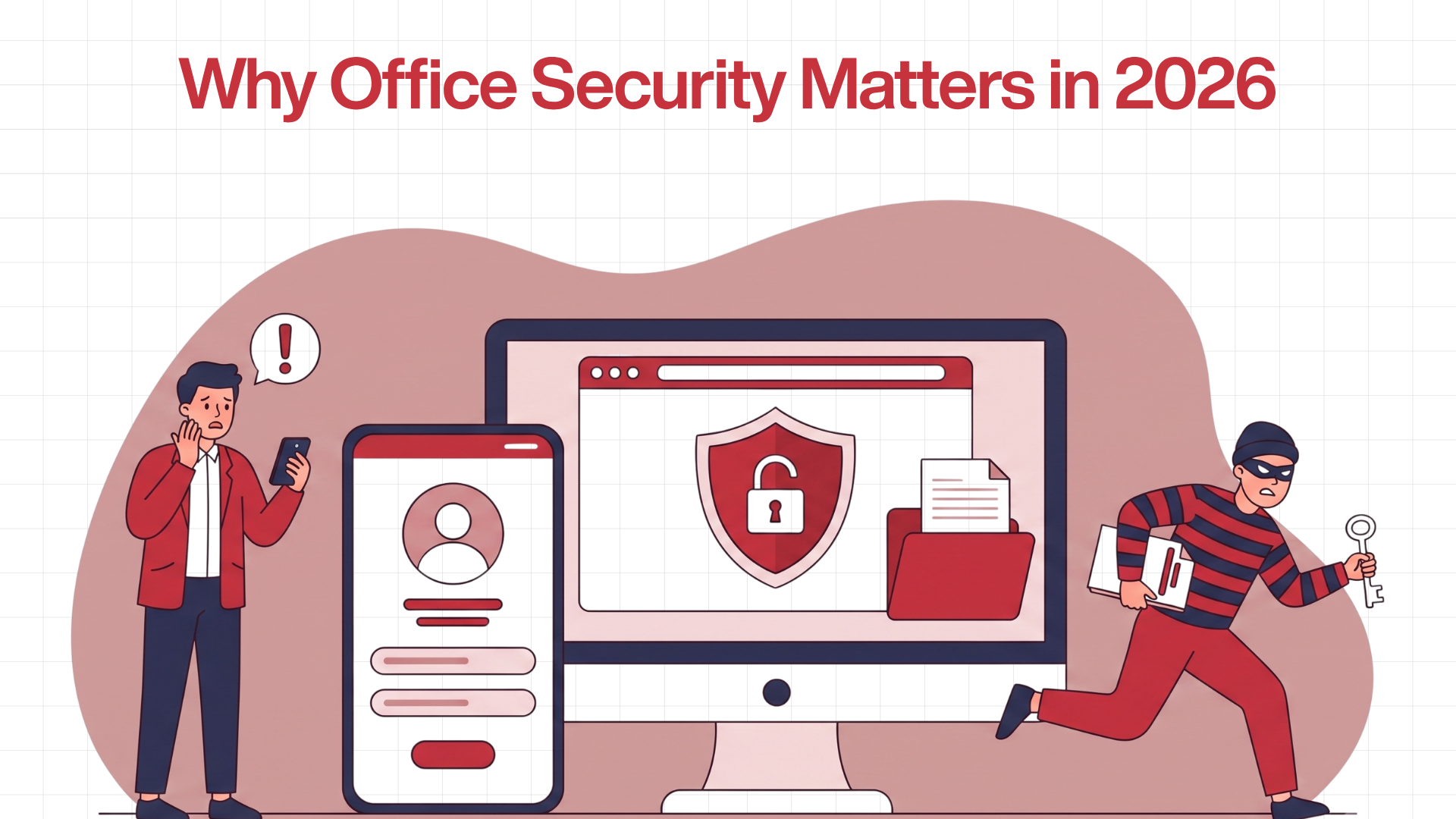
India’s enterprise footprint has expanded faster than many organisations have modernised their security. The result is a widening gap between the threats companies face and the tools they use to manage them, and the gap now carries a measurable price tag.
In its 2025 Cost of a Data Breach Report, IBM found that the average breach cost an Indian organisation ₹220 million, an all-time high and the steepest of any country surveyed, up roughly 13% from the previous year (IBM, 2025). Not every breach starts at a keyboard. Physical access an unverified visitor, an ex-contractor whose badge still works, a stranger who walked in behind an employee remains a quiet but persistent entry point into systems and data.
The Hidden Cost of the "Pen-and-Paper" Approach
Legacy visitor logs create a false sense of security. A signature in a notebook proves almost nothing:
- No identity verification. Manual entries rarely cross-check ID, so anyone can write any name.
- No usable audit trail. Without precise timestamps, reconstructing who was present during an incident is nearly impossible.
- No overstay or anomaly alerts. Facility teams have no automated way to flag someone who lingers past authorised hours.
- No unified view. Across multi-tenant towers and large campuses, paper logs cannot give security a single, current picture.
Security Has Become a Governance Issue
For Indian enterprises, physical security has moved from facilities management into the realm of corporate governance. The Digital Personal Data Protection (DPDP) Act, 2023, was operationalised when the DPDP Rules, 2025, were notified in November 2025, with core compliance obligations phased in through May 2027 (Press Information Bureau, Government of India). The framework places binding duties on organisations that handle personal data, and a visitor record full of names, phone numbers, and ID details is exactly that. Penalties for serious lapses can run to ₹250 crore, which makes verifiable, well-governed visitor data a compliance asset rather than an afterthought.
Internal risk compounds the picture. The Ponemon Institute’s 2025 Cost of Insider Risks study put the average annual cost of insider incidents at USD 17.4 million per organisation, with 55% traced to negligence rather than malice (Ponemon Institute / DTEX, 2025). Most insider damage isn’t espionage; it’s a contractor who kept access too long, or an employee in a zone they shouldn’t be in.
Traditional vs. Modern Office Security at a Glance
Dimension | Traditional Security | Modern Unified Security |
Primary tools | CCTV and security guards | Integrated software, biometrics, QR/mobile credentials |
Access methods | Physical keys and ID cards | Mobile credentials, biometrics, key cards |
Visitor tracking | Paper sign-in registers | Digital visitor management systems |
Data usage | Reactive, reviewed after an event | Proactive real-time alerts and analytics |
Audit trails | Manual or non-existent | Automated, timestamped digital logs |
The Biggest Physical Security Gaps in Indian Offices
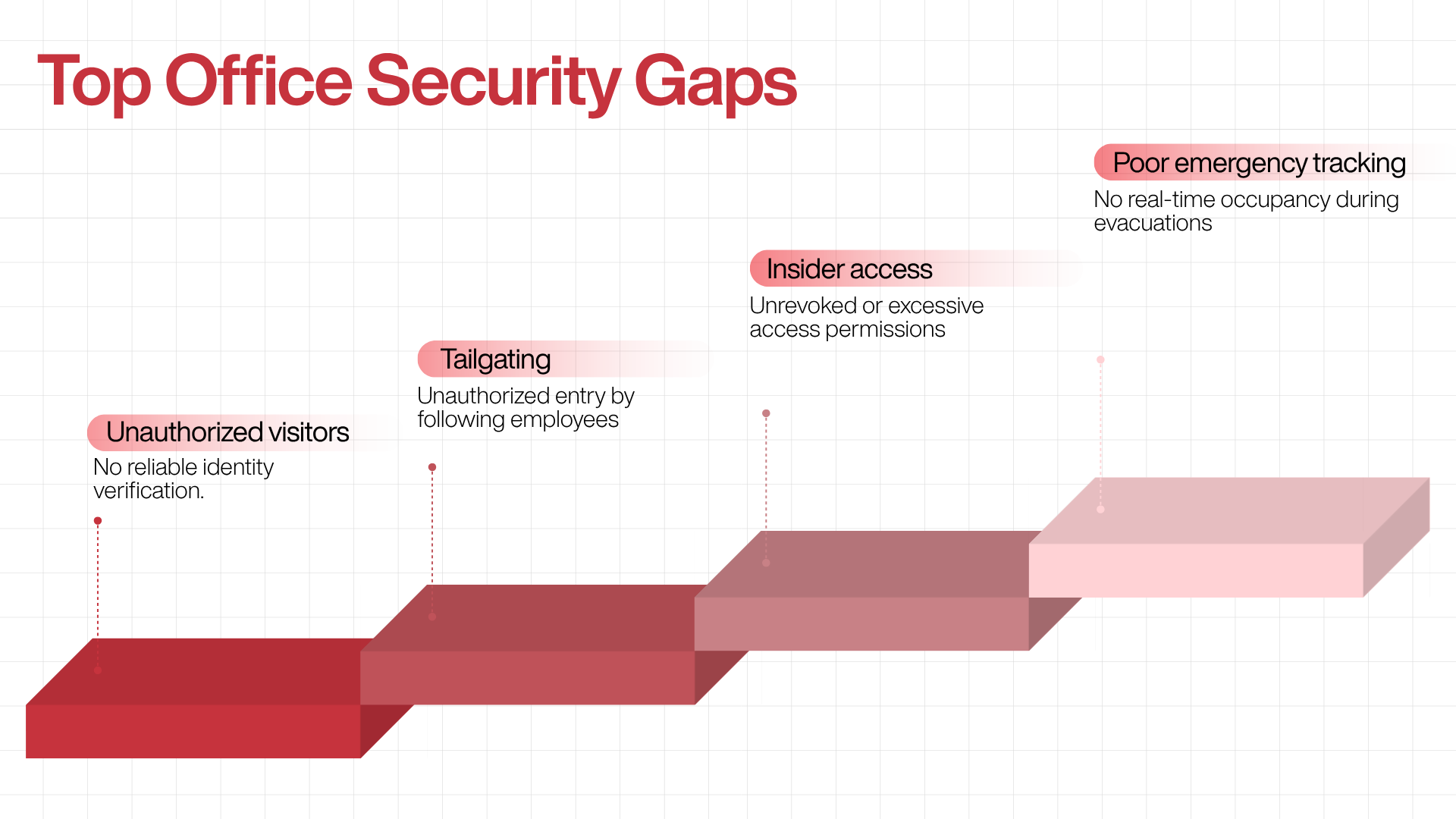
Most systemic risk comes down to one thing: not knowing what is happening at your entry points. Without a centralised, real-time view of who entered, who is currently inside, and who has left, security teams are forced into a reactive loop. Four gaps recur across enterprises of every size.
1. Unauthorised Visitor Access
When identity isn’t verified at the door, there’s no reliable way to know who is in the building. Paper registers can’t cross-check ID documents, can’t flag a previously barred individual, and can’t instantly notify the host that a guest has arrived.
2. Tailgating
Tailgating: an unauthorised person slipping through a secured door behind an authorised employee is the textbook example of a low-tech threat with high-cost consequences. It exploits ordinary social courtesy rather than any technical weakness, which is exactly why it’s so hard to stop.
The data is sobering. In Boon Edam’s security-entrance research, more than 70% of respondents believed their organisation was vulnerable to a breach caused by tailgating, while only around 15% actually tracked tailgating incidents (reported via security industry surveys). The threat is widely acknowledged and rarely measured a dangerous combination.
3. Insider and Unrevoked Access
The risk isn’t always a stranger. Contractors with access that was never switched off, former employees whose credentials still work, and staff wandering into zones outside their role all create invisible exposure. Because most insider incidents stem from negligence rather than intent, they tend to go unnoticed until something goes wrong.
4. Evacuation and Safety Accountability
Security and life safety are directly linked. During a fire, medical emergency, or evacuation, knowing precisely who is in the building is a safety mandate, not a convenience. Without a real-time occupancy record covering both employees and visitors, verifying that everyone is accounted for becomes guesswork at the worst possible moment.
Quick answer: Office security is the combined set of policies, processes, and technologies that protect a workplace’s people, premises, assets, and data from unauthorised access, theft, and safety incidents. For Indian enterprises in 2026, the single most effective first step is replacing the paper visitor logbook with a digital, QR-based visitor management system that verifies identity, creates an instant audit trail, and shows administrators exactly who is on-site in real time.
Threat Vector | Primary Risks | Impact on the Enterprise |
Unverified visitors | No ID check, no host notification, no record | Untracked individuals inside secure premises |
Tailgating | Entry with no badge swipe, no log entry | Unrecorded presence, compliance gaps, theft |
Insider / stale access | Active credentials for ex-staff and contractors | Data exposure, IP leakage, system tampering |
No occupancy record | Unknown headcount during emergencies | Failed evacuation accountability, liability |
12 Office Security Best Practices for Enterprises
Below is a practical, field-tested framework. Treat it as a maturity checklist: most organisations already do two or three of these well and have clear room to grow on the rest.
1. Replace Paper Registers with a Digital Visitor Management System (VMS)
This is the highest-leverage single change most offices can make. A structured digital VMS captures identity (name plus photo or ID proof), visit context (purpose and host), and precise, automated timestamps for entry and exit, turning the front desk from a blind spot into a verified record.
2. Enforce Role-Based, Dynamic Access Control
Access privileges should map to an employee’s current responsibilities and update instantly during role changes, extended leave, or offboarding. A standard office pass should never automatically open sensitive doors.
Sensitive Zone | Primary Security Risk |
Server and IT rooms | Unauthorised data access, hardware tampering |
R&D and lab areas | IP theft, leaks of unreleased products |
Executive floors | Exposure of confidential strategy |
Data storage units | Physical breach of backups |
3. Use Contactless QR-Based Check-In
QR check-in removes reception bottlenecks and hardware dependencies. A visitor scans a code on their own phone, fills a short digital form, the host is notified automatically, and a digital pass is issued no app download, no manual transcription.
4. Maintain Real-Time Occupancy Visibility
Knowing someone crossed the lobby is only half the job. Security teams need a live view of who is currently on-site, which is what makes proactive response and emergency accountability possible.
5. Build Layered Security Perimeters
Combine clear signage, physical barriers (turnstiles, controlled doors), and digital access locks. Every sensitive area should log both successful entries and failed attempts to create a clean trail for audits.
6. Run Continuous Employee Security Awareness Training
Technology fails when people aren’t trained. Embed security into onboarding and refresh it at least annually, focusing on:
- Tailgating prevention: never hold a secured door for an unverified person.
- Challenging strangers: empowering staff to safely question unbadged individuals
- Escort protocols: hosts stay responsible for guests for the full visit.
7. Document and Test Response Procedures
A policy that only lives in a document offers no protection. Write role-specific protocols and rehearse them through drills for scenarios such as an unbadged person detected on-site, a visitor who refuses to check out, a reported missing asset, or a system failure during an evacuation.
8. Keep Centralised, Cloud-Based Records
Administrators need instant access to current data. Cloud-based platforms make records available across branches without expensive on-site infrastructure or manual reconciliation of paper logs.
9. Audit Your Physical Security Regularly
Gaps appear slowly as habits slip. Conduct structured quarterly or biannual audits covering access logs and denied entries, ex-employee access removal, and the working condition of locks, cameras, and scanners.
10. Use Workplace Analytics for Smarter Decisions
Digital systems generate operational data worth mining. Patterns in peak visitor times and entry-point congestion inform staffing; recurring blacklist flags and host-response metrics support proactive threat prevention.
11. Strengthen Regulatory Compliance Readiness
In regulated sectors, a clean audit trail is a legal necessity. Timestamped, exportable digital logs satisfy compliance reviews on demand provided your data pools stay consistent, and your processes track shifting regulatory expectations.
12. Build a Security-First Culture from the Top
The strongest posture is cultural. Leadership must follow the same protocols as everyone else, including senior executives and VIP guests. The goal is simple: make the secure option the easiest option in daily operations.
The Role of a Visitor Management System in Office Security
A Visitor Management System (VMS) is the operational core of a modern office security strategy. By replacing manual logs with automation, it strengthens security, supports compliance, and streamlines the front desk at the same time.
Dimension | Manual (Paper Logs) | Modern VMS (Digital) |
Check-in | Manual transcription missed data, typos, illegible handwriting | QR or kiosk capture of identity, purpose, host, and timestamp |
Visibility | Flip through pages to guess who’s still inside | Live dashboard of everyone currently on-site |
Audit trail | Vulnerable to loss; slow to search | Secure, searchable, timestamped logs |
Compliance | Hard to prove adherence | Structured, audit-ready data aligned to regulation |
Why This Matters by Industry
Sector | Requirement | How a VMS Helps |
BFSI | Data protection, fraud prevention, audit-ready history | Restricts access to sensitive hubs; tamper-evident logs |
Pharmaceuticals | IP protection, safety and contamination controls | Tracks movement; enforces NDAs or safety briefings at check-in |
Manufacturing | Liability management, restricted-zone monitoring | Forces safety acknowledgements; records precise duration on-site |
Technology | Protecting data centres and client confidentiality | Instant host notifications; no unescorted guests in secure zones |
Office Security Checklist for Enterprises
Use this to benchmark your current posture.
Visitor management
- Digital VMS in place, replacing paper registers
- QR-based or contactless check-in operational
- Identity verification defined and enforced
- Digital passes issued for all entries
- Blacklist management enabled and updated
- Pre-approval workflow for scheduled visitors
Access control
- Role-based access policies documented and enforced
- Sensitive-zone access restricted and logged
- Former-employee access revoked promptly
- Contractor access limited by area and duration
Monitoring and records
- Real-time occupancy data available to admins
- Automated check-out tracking in place
- Cloud audit trail with export capability
- Security analytics reviewed on a schedule
Policies and training
- Security awareness training for all employees
- Response procedures documented and tested
- Visitor escort policy communicated
- Audit scheduled at least twice a year
Compliance
- Visitor records structured and retrievable for audit
- Identity-verification (KYC) requirements assessed
- Health and safety documentation integrated where required
How Qudify Supports Modern Workplace Security

Qudify is a QR-based workplace management platform built for the Indian enterprise market, designed around a simple principle: the only hardware required is the smartphone everyone already owns.
Its visitor management system replaces the paper logbook with a fully digital, cloud-based check-in. Visitors scan a QR code no app download required complete a short form, and the host is notified instantly over WhatsApp, creating a frictionless arrival for the guest and a complete, accurate record for security. For high-traffic receptions, this removes queues and eliminates manual data-entry errors while giving administrators real-time visibility into who is on-site across every entry point.
Several capabilities map directly to the best practices above:
- Blacklist management lets security teams flag restricted individuals and receive alerts on attempted entry, something paper systems simply cannot do.
- Pre-invite and digital passes speed up check-in for scheduled guests and create verifiable, tamper-evident records.
- Office-wise admin access and cloud architecture support centralised monitoring across multiple locations, making a consistent standard practical for enterprises operating across cities. Qudify reports serve 250+ sites for 150+ enterprise clients across 100+ Indian cities.
- Structured, timestamped logs provide the audit-trail documentation that regulated industries increasingly need to demonstrate visitor access control.
- Comprehensive analytics turn entry data into staffing and threat-prevention insight.
Beyond security, the shift away from paper supports broader sustainability and operational-efficiency goals at the front desk. Enterprises evaluating digital visitor management as a first modernisation step can book a demo with Qudify.
Conclusion
Office security in 2026 is a management discipline, not just an infrastructure purchase. The enterprises that get it right aren’t necessarily those with the most cameras; they’re the ones that replaced guesswork with verified data, manual processes with digital systems, and reactive responses with proactive monitoring.
For most Indian organisations, the highest-impact starting point is the front door: swapping the paper register for a digital, QR-based system that verifies identity, generates accurate records, and shows administrators who is on-site in real time. From that foundation, access control, training, audits, and analytics build a posture that genuinely protects people, assets, and the organisation’s standing.
The technology is available, proven, and designed for the Indian context. The hard part is the decision to act, and it begins with recognising that what you cannot see, you cannot secure.
Frequently Asked Questions
What is office security?
Office security is the combination of policies, technologies, and processes that protect a workplace’s people, assets, and premises from unauthorised access, theft, and safety incidents. It typically covers visitor management, access control, real-time monitoring, employee training, and documented response procedures.
Why is office security important for enterprises?
It protects employees, prevents unauthorised access to sensitive areas and data, safeguards physical and intellectual assets, supports regulatory compliance, and enables fast response during emergencies. With India recording the world’s highest average data breach cost (₹220 million in 2025), weak physical access controls carry direct financial and legal risk.
What is a visitor management system (VMS)?
A VMS is a digital platform that handles the check-in, identity verification, tracking, and check-out of visitors. Modern systems replace paper registers with cloud-based, QR-enabled tools that produce real-time records and audit-ready documentation.
What is tailgating, and why is it dangerous?
Tailgating is when an unauthorised person enters a secured area by following an authorised employee through the door. It’s dangerous because it requires no technical skill, leaves no log entry, and is widely under-tracked. Most organisations recognise the risk but don’t actively measure it.
How can enterprises prevent unauthorised access?
By deploying a digital VMS with identity verification, using QR-based check-in at all entry points, enforcing role-based access control, maintaining a blacklist, auditing access logs regularly, and training employees to recognise and report unverified entry.
How does QR-based visitor management improve security?
It eliminates manual data-entry errors, verifies identity digitally, issues tamper-evident passes, generates real-time entry and exit logs, and triggers instant host notifications without requiring specialised hardware or extra reception staff.
Is a visitor management system required for compliance in India?
While no single law mandates a specific product, the DPDP Rules, 2025 impose binding obligations on how organisations handle personal data, and regulated sectors such as BFSI, pharma, and manufacturing expect verifiable visitor records. A digital VMS makes producing audit-ready evidence straightforward.
What are the most common office security mistakes?
Relying on paper logbooks, failing to revoke ex-employee and contractor access, treating training as a one-time event, leaving sensitive zones on a single access tier, and never testing response procedures through drills.
How often should an office conduct a security audit?
At least twice a year. Quarterly reviews are advisable for larger or highly regulated facilities, covering access logs, denied entries, ex-employee access removal, and the working condition of physical security hardware.
Does a VMS help during emergencies and evacuations?
Yes. A live occupancy record of employees and visitors is essential for headcount and evacuation accountability, something a paper register cannot reliably provide.
What are the best office security practices for enterprises in 2026?
Deploy a digital VMS, enforce role- and zone-based access control, use QR check-in, keep real-time records in the cloud, audit regularly, train employees on awareness, document and test response plans, and use analytics to address recurring vulnerabilities.
How is Qudify different from a traditional visitor logbook?
Qudify replaces handwritten logs with QR-based, app-free check-in, instant WhatsApp host notifications, blacklist alerts, digital passes, real-time multi-location dashboards, and exportable timestamped audit trails, turning the front desk from a blind spot into a verified, governable record.