
VMS vs Manual Reception: What Automating Your Front Desk Actually Saves
Key Takeaways
- spend hides inside salaries, floor space, and compliance risk.
- A visitor management system rarely removes a receptionist; it strips out the mechanical work and returns that time to hospitality and other tasks.
- The most defensible saving is staff time per check-in: paper runs 2–4 minutes per visitor, a QR scan under a minute.
- Under India’s DPDP Rules 2025, an open paper logbook is a live compliance liability and the office, not the vendor, carries the legal responsibility.
- Hardware, not subscription price, is what separates cheap VMS from expensive VMS; kiosks, tablets, and badge printers drive total cost of ownership.
- No-shows, unclosed check-outs, and untracked contractors are real costs a paper desk can’t see and a digital system surfaces on its own.
- Break-even is mostly about volume: under roughly 15–20 visitors a day, the case rests on risk and first impressions, not time saved.
A visitor arrives for a 3:00 pm meeting a couple of minutes early. The receptionist is on the phone with a courier company, a vendor is waiting to be badged, and two interview candidates are hovering near the door. The guest signs a worn register, the fourth name on a page anyone walking past can read, and then stands there, because the host upstairs has no idea she’s arrived. In the gap between walking in and being helped, the office has already spent money. It just hasn’t written it down anywhere.
That’s the real problem with comparing a visitor management system (VMS) to a manual reception desk: the manual desk looks free. There’s a register that costs a few hundred rupees, a pen on a string, and a person who was going to be sitting there anyway. Software arrives with a price tag, a setup, and a line on someone’s budget. So on paper, literally, manual wins.
The comparison only gets useful when you stop asking what each option costs to buy and start asking what each one costs to run. That’s what this guide does. It isn’t a pitch for going digital, and it isn’t a roundup of ten tools. It lays out, as fairly as the evidence allows, where a VMS genuinely saves money over a manual desk, where the savings are softer than vendors claim, and how to work out which side of the line your own office sits on.
One note on scope. The numbers and the legal framing lean toward the Indian market, because that’s where the compliance picture has shifted most sharply. The operational logic staff time, no-shows, total cost of ownership applies anywhere.
What "Manual Reception" Actually Costs
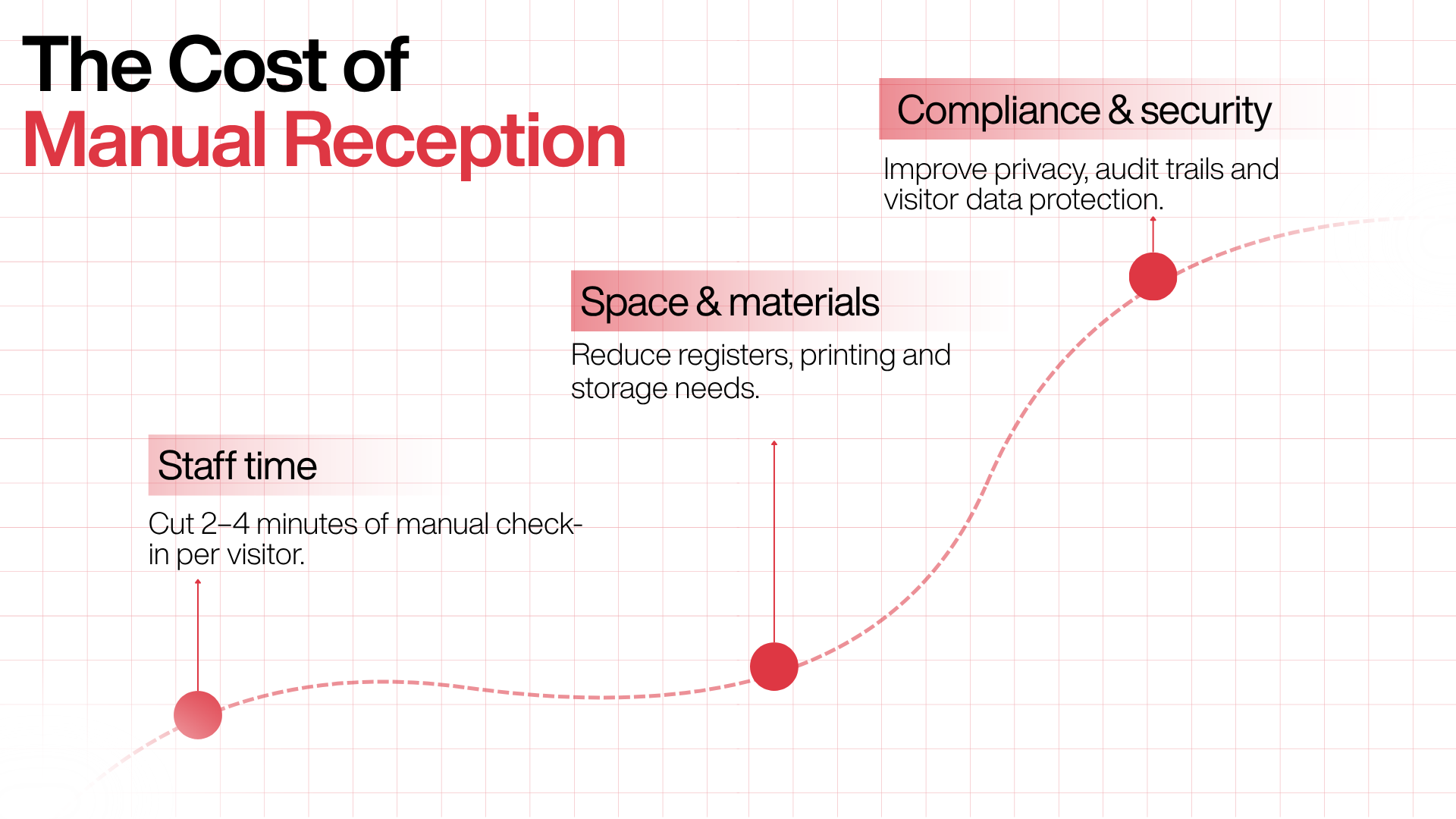
Start with the thing that feels free, because that’s where most of the hidden money is. A manual front desk is really three cost centres wearing one uniform.
Staff time per visitor. This is the big one, and it’s measurable. Independent write-ups of paper check-in put the process at roughly two to four minutes per visitor: the walk-up, the handwriting, then the manual notification, where the receptionist phones the host, walks to their desk, or fires off a message while the guest waits. At two visitors a day, nobody notices. At fifteen to twenty, it eats a real chunk of someone’s shift. And if those visitors cluster between 9:00 and 9:30, you don’t get a steady trickle; you get a queue, and a receptionist spending time at the worst possible moment, when several people need attention at once.
Space and materials. Less obvious, rarely counted. Registers have to live somewhere, and in a lot of Indian offices that “somewhere” is a cupboard of archived binders sitting on commercial floor space you lease by the square foot. The registers, the printing, the pens are trivial on their own. The real estate they occupy is the part people forget.
Compliance and security exposure. This used to be a soft, hand-wavy risk. It isn’t anymore, and it gets its own section below. The short version: an open logbook shows every visitor’s name, company, and host to the next person who signs in, keeps no usable audit trail, and stores personal data in a form that sits awkwardly against India’s current data-protection expectations.
None of these three arrive as an invoice, which is exactly why they’re easy to ignore and expensive to keep paying. One industry analysis puts it well: paper looks free until you count the audits, the delays, the lost badges, the exposed information, and the receptionist interruptions, so the honest way to judge it is on total cost, not sticker cost.
There’s a fourth cost that isn’t about your staff at all; it’s about the visitor, and by extension your brand. A candidate for a senior role who waits fifteen minutes at a chaotic front desk has learned something about how the place runs before meeting anyone. You can’t put that on a spreadsheet. Ask any hiring manager whether it matters.
What Is A Visitor Management System and What Does It Cost?
A visitor management system (VMS) is software that automates how an organisation registers, tracks, and manages everyone who enters its premises. It replaces the paper logbook with a digital workflow that captures visitor details, records consent, notifies the host, issues a pass, and stores a secure, searchable record of every entry and exit. Systems range from tablet-and-kiosk setups at a staffed lobby to fully contactless, QR-and-phone flows that need no dedicated hardware.
What a VMS Actually Costs
Now the side with the visible price tag, which turns out to be more layered than the subscription line suggests.
The software: Most modern visitor management runs as cloud-based SaaS, priced per location or per entry point, sometimes tiered by feature or visitor volume. Here’s the honest state of the market, though: vendor pricing in this category is frequently not published. Plenty of providers, especially those chasing enterprise and multi-site deals, keep pricing behind a demo call. Where a number isn’t publicly listed, treat any second-hand figure with suspicion and confirm it directly. That isn’t evasion on our part; it’s the actual condition of the market, and pretending otherwise would mean making prices up.
The hardware and this is where budgets quietly blow up: A VMS is only “cheap” if it doesn’t drag a shopping list of equipment behind it. Kiosk-based systems can need industrial-grade tablets or touchscreens at reception, ID scanners, and badge printers, plus the mounting, the accessories, and the upkeep and replacement of all of it. One office might start with a single desk device; a corporate campus could be looking at several kiosks, door integrations, and location-specific setups. This is the main reason two systems with identical monthly fees can carry wildly different real costs.
Implementation and adoption: Configuring workflows, training the desk, and getting employees to actually use host notifications all take time. Usually modest, never zero, and a system nobody adopts is pure cost with no return.
That points to the pivot of this whole comparison: the meaningful cost difference between VMS options is usually hardware dependency, not software price. A hardware-heavy kiosk system and a hardware-free QR system can look near-identical on a feature matrix and cost very different amounts to own over three years. Which brings us to the design choice that increasingly splits the market.
The hardware-free approach, and why it changes the math
A wave of newer platforms, Qudify among them, in the Indian market is built on a deliberately “asset-light” or “zero-hardware” model: visitors check in by scanning a QR code on their own phone, hosts approve and get alerted over WhatsApp, and there’s no kiosk, no badge printer, and no app for the visitor to download. The idea is that the only hardware most offices genuinely need is a phone everyone already carries.
Why this matters for cost isn’t ideological. Removing the hardware line removes the part of total cost of ownership that’s hardest to predict and most prone to overrun: the tablets that break, the badge printers that jam, the kiosks that reach end of life. It doesn’t make a VMS free. It makes the total cost track the subscription instead of a capital project.
That’s a real advantage, and the trade-off deserves equal honesty: a pure QR-and-phone model assumes visitors carry smartphones and are comfortable scanning. For most corporate offices that’s a safe bet, but it’s worth keeping a simple fallback a shared device or a receptionist-assisted flow for the visitor whose battery is dead or who doesn’t carry a smartphone at all. A good system doesn’t force everyone through the same door; it makes sure nobody’s stuck at yours.
The Savings That Are Real, And The Softer Savings
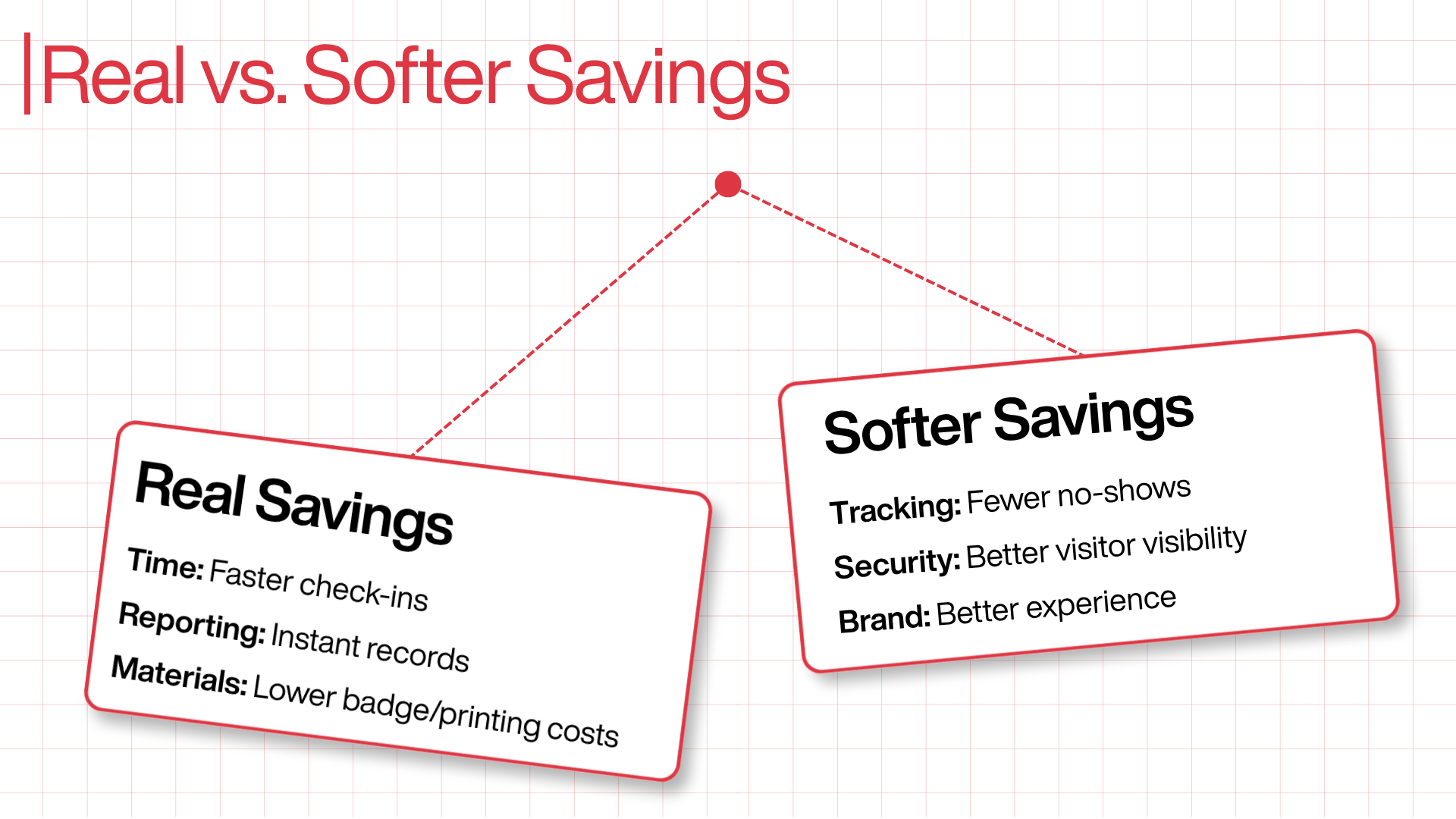
Vendors tend to present every benefit of automation as a hard saving. It’s more useful to sort them, because some are bankable and some depend heavily on your situation.
Real, measurable savings
Staff time per check-in: The most defensible number in the comparison. Swapping a 2–4 minute manual process for a sub-minute QR scan, and swapping manual host notification for an automatic alert, takes the mechanical labour out of every visitor interaction. The receptionist stops being the notification system. Here’s where honesty matters: that usually doesn’t mean you remove the receptionist. Most offices redeploy the freed time to hospitality, security awareness, and the rest of what a front-desk person actually does. The saving is real; it shows up as capacity regained, not headcount cut.
End-of-day reporting and audit prep: Manual compilation of who-visited-when disappears. The log is already digital, timestamped, and searchable by name, host, company, or time. When a facility manager calls at 9 PM asking exactly who entered between 6 and 9 the previous evening, the answer is a search, not a squint at yesterday’s handwriting.
Badge and materials handling: Where badges are genuinely needed, automatic issuance kills the handwriting and the jammed label printers. Where they aren’t and plenty of offices badge from habit rather than need, a digital pass removes the cost outright.
Softer savings real, but situational
No-shows and unclosed visits: A cost a paper desk literally cannot see: the visitor who never checks out, the contractor logged in but never logged out, the meeting room reserved and never used. These compound quietly. A digital system surfaces them; whether that turns into money saved depends on how much they were hurting you to begin with. Marginal for a small office. Potentially significant for a busy tower tracking contractors.
Security incident cost avoidance: Hard to quantify, easy to underrate. Knowing verifiably who is in your building is worth close to nothing on an ordinary Tuesday and a great deal on the day something goes wrong. You’re buying an insurance-like cut in tail risk, not a monthly line saving.
Brand and first impressions: Valuable and genuinely unmeasurable. Treat it as a tiebreaker, not a line item.
The point of splitting these out isn’t to argue you out of automation. It’s that a business case built only on the soft savings is fragile, while one built on the hard ones staff time, reporting, materials holds up. Lead with the ones that hold up.
The Compliance Shift That Changed The Argument (India)
For years, “a paper register isn’t secure” was the weakest line in any VMS pitch, because it carried no consequence. That has changed, and a 2026 cost comparison that skips it is incomplete.
India’s Digital Personal Data Protection (DPDP) Rules, 2025 were notified on 13 November 2025, operationalising the DPDP Act, 2023. Full substantive compliance is required by 13 May 2027, at the close of an 18-month runway, and the Data Protection Board of India is already constituted, so a person can file a complaint today, well ahead of the deadline.
The top penalty, for failing to take reasonable security safeguards that lead to a breach, is up to ₹250 crore per instance under Section 8(5) read with the Schedule to Section 33, and because penalties are assessed per violation, a single incident that trips several obligations can stack well beyond that.
Here’s why this lands squarely on the front desk. The moment your office collects a visitor’s name, phone number, or photo, your organisation becomes the Data Fiduciary for that data and the legal duty for consent, retention, and access control sits with you, the office, not with whichever software vendor you use. An open logbook, where every entry is visible to the next person and nothing records consent, is hard to square with that duty. A digital system that captures explicit consent, holds data in an access-controlled environment, and can produce a clean audit trail is a far more defensible place to stand.
This reframes the whole cost question. Spend on a VMS isn’t only buying time savings; in the Indian context it’s buying down a compliance exposure that now has a number attached and a regulator with the power to act. That doesn’t mean panic-buying; May 2027 leaves runway to plan properly. But “the register is fine” has stopped being a cost-free position.
For wider context on why perimeter data hygiene matters: IBM’s 2026 Cost of a Data Breach Report put the global average breach cost at a record USD 4.99 million (IBM). A reception logbook obviously isn’t the vector for a multi-million-dollar breach, but weak identity practices and exposed personal information at the front door make the whole environment easier to compromise, and that’s the category of risk the figure represents.
Manual Reception vs. VMS: The Honest Comparison
The table sums up the trade-offs. It’s deliberately not a scoreboard where digital wins every row, because it doesn’t.
Factor | Manual reception (paper register) | Cloud VMS (with hardware) | Cloud VMS (hardware-free / QR) |
Time per check-in | ~2–4 minutes | Under 1 minute | Under 1 minute (QR scan) |
Host notification | Manual (call/walk/message) | Automatic | Automatic (e.g. WhatsApp) |
Upfront hardware | Register + pen | Kiosk, tablet, badge printer, scanner | None (visitor’s own phone) |
Ongoing materials | Registers, printing, badges | Badge stock, device upkeep | Minimal |
Audit trail | Poor (illegible, unsearchable) | Strong (timestamped, searchable) | Strong (timestamped, searchable) |
Data-privacy posture | Weak (open, exposed data) | Strong (access-controlled) | Strong (access-controlled) |
Best-fit volume | Very low visitor counts | Higher volume, staffed lobby, badging needs | Most SME–enterprise offices, multi-site |
Total cost of ownership | Low sticker, high hidden | Higher (hardware-driven) | Moderate (subscription-driven) |
Pricing transparency | N/A | Often unlisted; confirm with vendor | Often unlisted; confirm with vendor |
Two honest reads of that table.
First, manual reception isn’t indefensible for every office. A very low-traffic site with minimal compliance exposure and no image-sensitive visitors can reasonably run a register for a while yet. The case for switching strengthens as volume, risk, and the cost of a poor first impression rise.
Second, the biggest real fork isn’t “paper vs digital”; most offices will end up digital. It’s “hardware-heavy vs hardware-free” within the digital option, and that’s where the total-cost-of-ownership gap actually lives.
How To Work Out Which Side You're On
Skip the feature matrices for a moment. The decision comes down to a handful of honest questions about your own building.
- How many visitors a day, and how bursty? The single biggest driver. Below roughly 15–20 and spread out, the time-saving case is weak, and you’re really deciding on risk and image. Above that, or heavily clustered at peak, the queue problem alone often justifies automating.
- What’s your compliance exposure? An Indian office collecting visitor personal data has the DPDP clock running, and the register is a liability regardless of volume. Regulated industries should weigh this heavily.
- How many sites? One small office and a multi-site operation are different problems. Centralised, office-wise administration is where digital pulls decisively ahead: one dashboard instead of one binder per building.
- Who are your visitors, and what does a bad first impression cost? A client-facing HQ running senior interviews carries reputational risk a factory floor may not.
- What’s your real appetite for hardware? Be honest about whether you want to own, maintain, and eventually replace kiosks and printers, or whether a phone-based flow fits your reality. This choice, more than the subscription, sets your three-year cost.
- Do you actually need badges and panels? Many offices badge and install room panels from habit. If a digital pass and an automatic host alert do the job, that’s hardware and cost you can skip.
- What’s the fallback plan? Whatever you pick, make sure there’s a graceful path for the visitor without a smartphone, a dead battery, or comfort with QR codes. The goal is to remove friction, not relocate it.
Answer those seven honestly, and the decision usually falls out on its own. You’re not choosing between a pen and a biometric door-lock; you’re matching a system to your actual size, risk, and budget.
What To Look For When Choosing A System
If you’re evaluating options, weigh them against how offices actually run rather than the length of the feature list. The factors that tend to matter most:
- Check-in friction for the visitor: Can a first-time guest check in without downloading anything? Every extra step costs you adoption.
- Host notification channels: Email, Slack, Teams, WhatsApp does the alert reach hosts where they’ll actually see it? A notification nobody reads is the same as no notification.
- Pre-registration: Can hosts invite guests ahead of time and move the data entry before arrival?
- Hardware dependency: Does it require kiosks and printers, or are those optional? This directly affects your total cost of ownership.
- Document handling: Can visitors sign NDAs or declarations digitally, with the signed copy attached to the visit record?
- Audit trail and real-time on-site list: Can you see who’s in the building right now and export records for an audit in seconds?
- Data handling: Consent capture, configurable fields, retention controls, role-based access, and (for Indian organisations) data residency.
- Multi-location administration: If you have several sites, can each be managed independently under one system?
- Analytics: Does it turn visit records into usable insight about footfall and space use?
- Support that understands your context: Responsiveness and channels matter, and for Indian workplaces, so does a team that understands local language, workflow, and compliance realities rather than operating at a global distance.
Where Qudify Fits In This Picture
We’ve kept vendors mostly out of this on purpose; the goal was to compare approaches, not sell a product. But since hardware is the crux of the cost question, it’s worth being direct about where Qudify sits, and where it doesn’t.
Qudify is a QR-first, cloud-based visitor management platform built by Qdesq Realtech, designed around the asset-light model this guide keeps returning to: visitors self-check in by scanning a QR code on their own phone, hosts approve and are alerted over WhatsApp, and there’s no kiosk, badge printer, or visitor app in the loop. It handles pre-invites, digital pass generation and verification, and for multi-site operators, office-wise admin controls that manage several locations from one place. The same platform also covers meeting-room booking and digital complaint management, which matters if you’d rather not stitch together separate tools for adjacent front-desk problems.
Where it’s the strong fit: Indian SMEs and enterprises that want the hardware line out of their total cost of ownership, that are thinking seriously about DPDP readiness at the front desk, and that prefer a contactless, phone-based flow to a staffed kiosk. The design goes straight at the two costs this guide flags as biggest and least predictable: receptionist time per visitor, and hardware.
Where to look harder or elsewhere: if your workflow genuinely needs on-the-spot printed badges at a staffed lobby, or deep integration with existing turnstile and access-control hardware as a firm requirement, check whether a QR-and-WhatsApp model covers it or whether a hardware-oriented platform suits you better. A fair comparison means naming what a tool isn’t built for, and a purely hardware-free model is a deliberate trade-off, not a universal answer.
On pricing: as with most of this category, confirm current figures with the vendor rather than trusting any number quoted second-hand.
The Bottom Line
“VMS vs manual reception” is a genuinely hard comparison because the two options fail on different axes. Manual reception fails quietly and continuously: a few minutes here, an exposed data field there, a binder taking up leased space none of it invoiced, all of it real. A VMS fails loudly and upfront: a visible price, a setup, and, if you’re careless about hardware, a bigger bill than you planned for.
Put the hidden costs on the same page as the visible ones, though, and the picture clears. The bankable case for automating the front desk rests on staff time per visitor and the end of manual reporting on solid ground. In India it now rests on compliance too, because the register has gone from a cost-free position to a liability with a regulator behind it. And the choice that actually sets your three-year cost isn’t whether to go digital; it’s whether to carry hardware while doing it.
For a small, low-traffic, low-risk office, a register can hold on a while longer. For most everyone else real visitor volume, multiple sites, compliance exposure, or a front desk that doubles as a first impression the question has quietly moved from whether to automate to how: with a cupboard full of hardware, or with the phone already in every visitor’s pocket. That second path is the one platforms like Qudify are built for, and it’s the one that keeps total cost closest to what you actually signed up to pay.
Frequently Asked Questions
How much time does a VMS actually save per visitor?
Independent estimates put manual paper check-in at roughly 2–4 minutes per visitor, including handwriting and manual host notification, versus under a minute for a QR scan with an automatic alert. The saving compounds fastest when visitors arrive in clusters at peak times, where manual processing creates queues.
Is a paper visitor register legal in India?
There’s no rule banning a register outright, but under the DPDP Rules 2025, your office is the Data Fiduciary for any visitor personal data you collect, and you carry the legal duty for consent, retention, and access control. An open logbook that exposes every visitor’s data and records no consent is hard to square with those obligations, with full compliance due 13 May 2027 and penalties up to ₹250 crore per instance for safeguard failures.
What's the cost difference between a kiosk-based VMS and a hardware-free one?
The software fees can be similar; the difference is hardware. Kiosk-based systems add tablets, ID scanners, badge printers, mounts, and their maintenance and replacement. A hardware-free QR system runs on the visitor’s own phone, so total cost of ownership tracks much closer to the subscription. Over three years, that gap is often the single biggest cost difference between two otherwise similar systems.
Do we still need visitor badges and room panels?
Often less than you’d assume, many offices badge and install panels from habit. If a digital pass on the visitor’s phone and an automatic host notification meet your security and hospitality needs, printed badges and dedicated panels become optional hardware, and optional cost. Judge them against your actual risk profile, not convention.
What if a visitor has no smartphone or can't scan a QR code?
A well-configured system keeps a fallback: a shared device at reception, a receptionist-assisted check-in, or a short URL a guest can be walked through. This also keeps the process accessible for older or less tech-comfortable visitors. The aim is to remove friction, not to force everyone through an identical door.
Can a VMS handle multiple office locations?
Yes, and this is where digital clearly beats paper. Cloud platforms with office-wise or centralised administration manage several sites from one dashboard, with consistent workflows and a single searchable record, instead of one binder and one process per building. For multi-site operators, this centralisation is frequently the main reason to switch.
Is a VMS only about security, or does it save operational money too?
Both, but the two savings behave differently. The operational savings staff time, faster reporting, fewer materials are measurable and bankable. The security and compliance savings are real but insurance-like: near-zero on an ordinary day, high when something goes wrong, or an auditor asks. A sound business case leads with the operational numbers and treats risk reduction as reinforcement.
How do no-shows and unclosed check-outs factor into cost?
A paper desk can’t see them; a digital system can. Visitors who never check out and contractors who linger in the record are quiet operational and security costs. How much they’re worth to eliminate depends on your volume: marginal for a small office, potentially significant for a busy multi-tenant building tracking contractors.